Inventory · iPhone · iPad · Web
HomeVault
An inventory of everything you own, kept on your own devices. Places from the building down to the drawer, a row for every unit, a tag on anything you want to find again.
I wrote HomeVault for my own gear: racks and cases that live inside each other, ten XLR cables split between a shelf and a van, mini PCs with serial numbers, a ladder someone borrowed. The phone holds the data and works without signal, and a server you host yourself keeps every device in step. There is no account, no analytics, and no way for me to read your inventory.
- Platforms
- iPhone · iPad · Web
- Tags
- QR · NFC · UHF RFID
- Data
- On device · your own server
- Status
- Beta on TestFlight · iOS 26
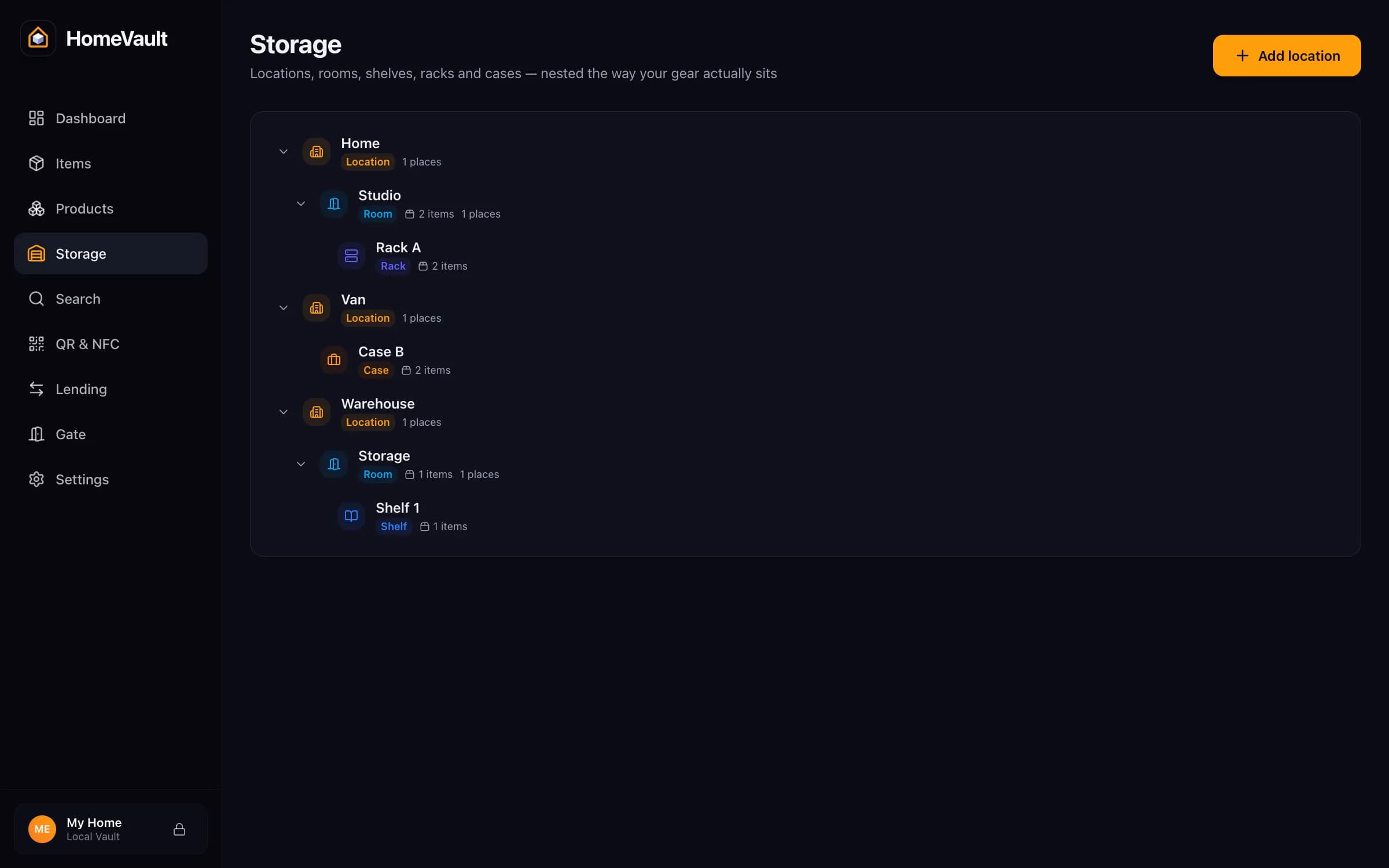
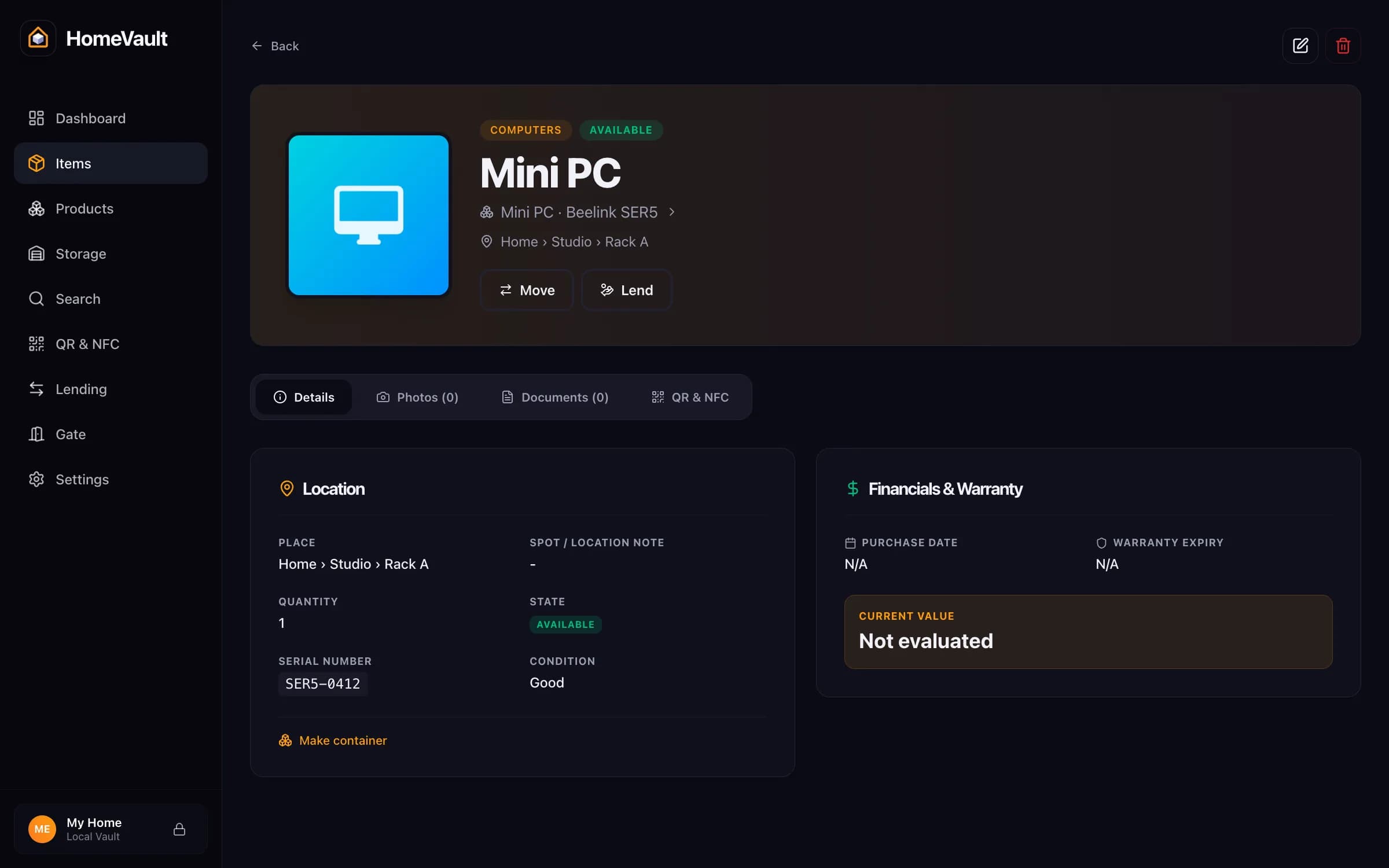
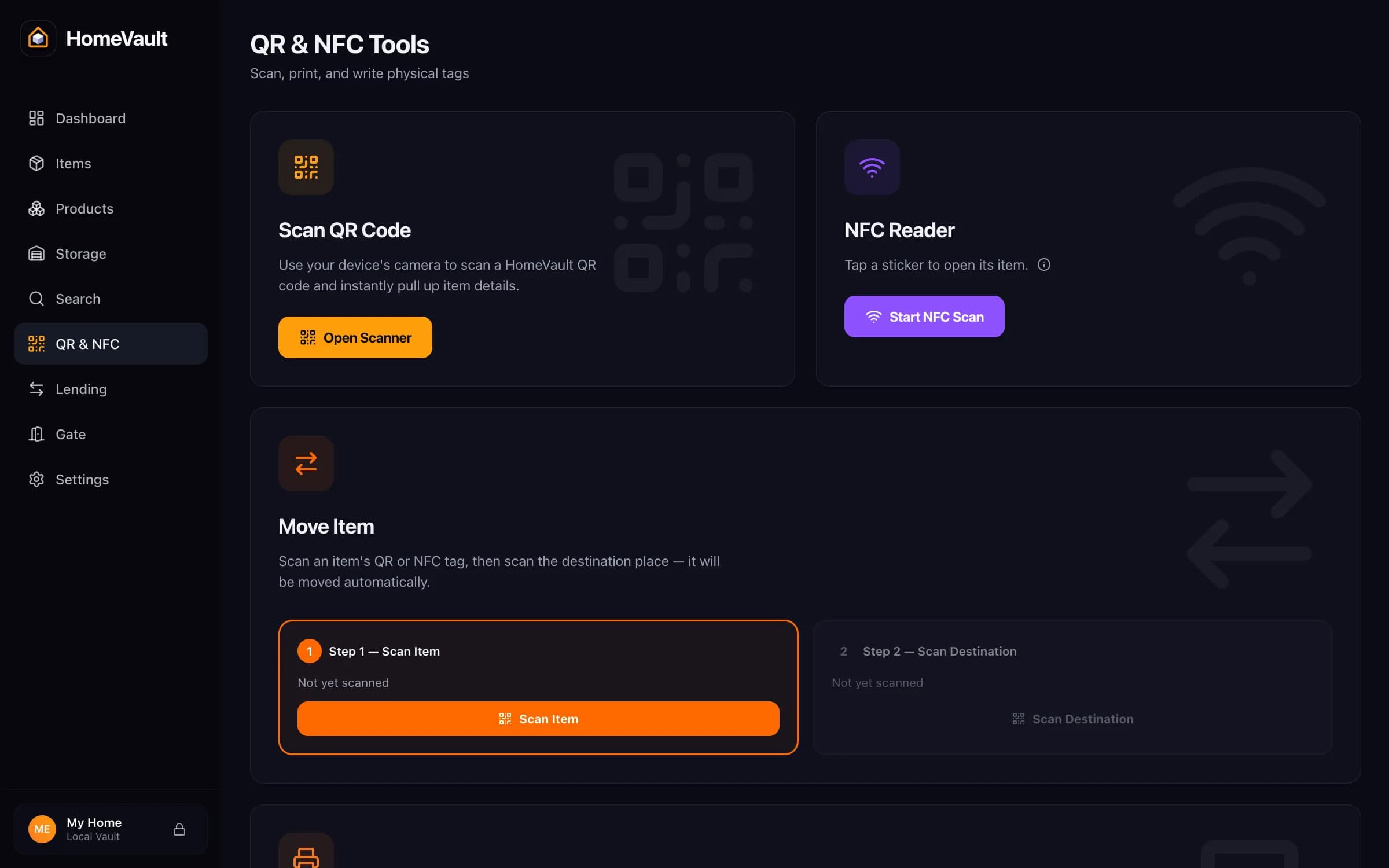
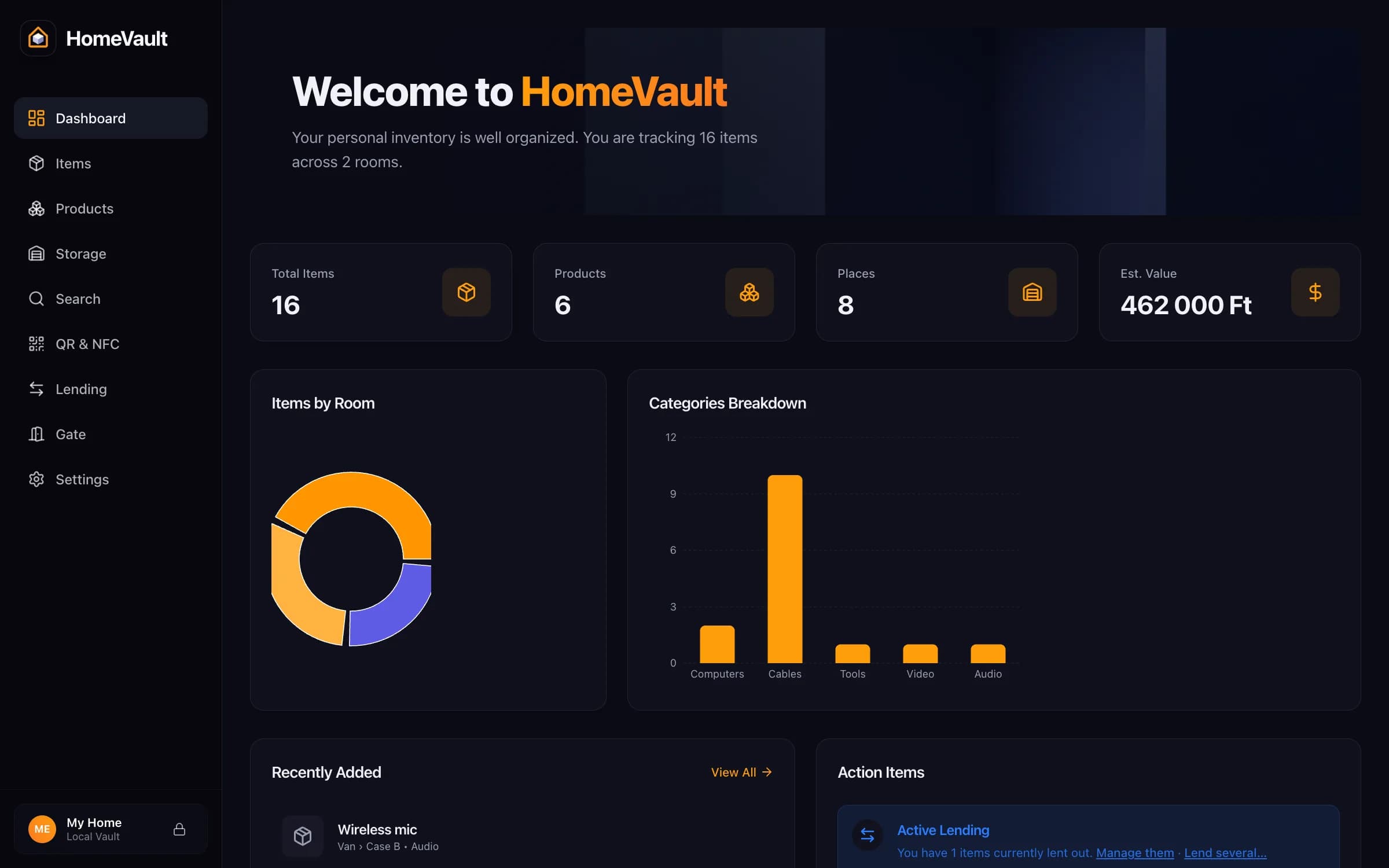
The same vault on the phone and on your server
Captured from the app's built-in demo vault, a fictional AV kit spread over a home, a warehouse and a van, synced to a local server. Scroll, and the browser and the phone follow the captions.
01 / 04
Places that nest
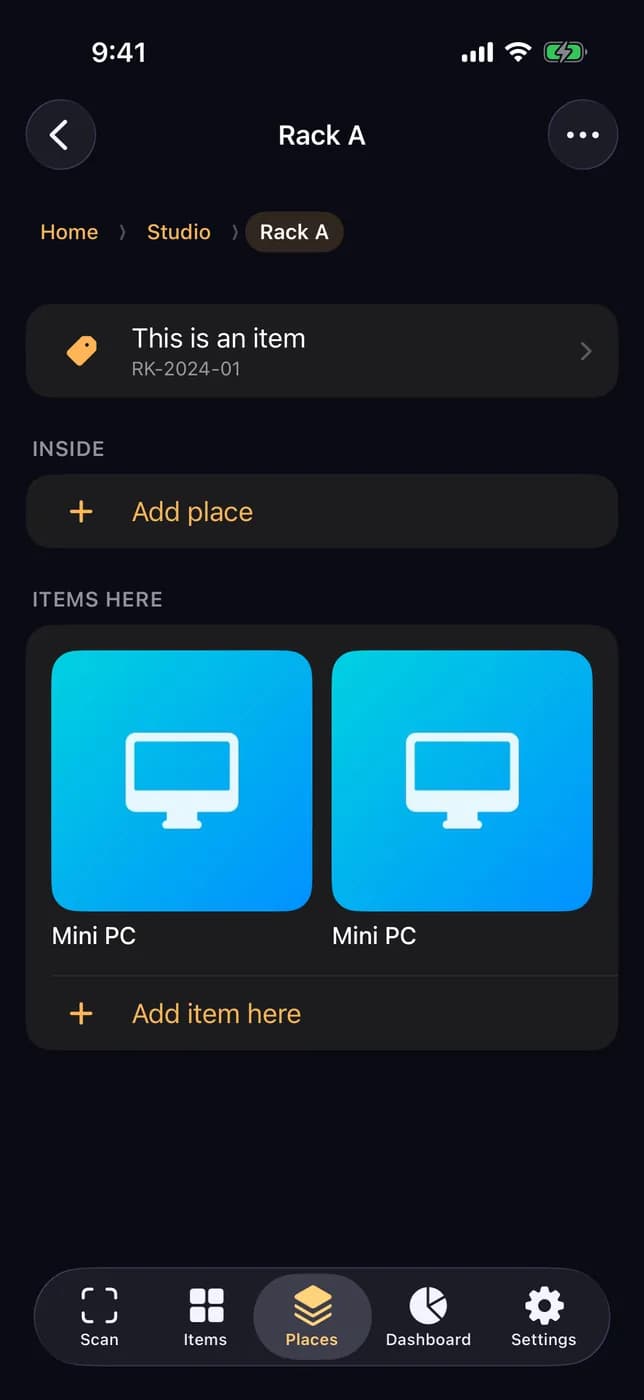
Location, room, shelf, rack, case, box, drawer, cabinet. The browser shows the whole tree; the phone opens Rack A inside the studio, with the rack's own record above what sits in it.
02 / 04
One unit, one row
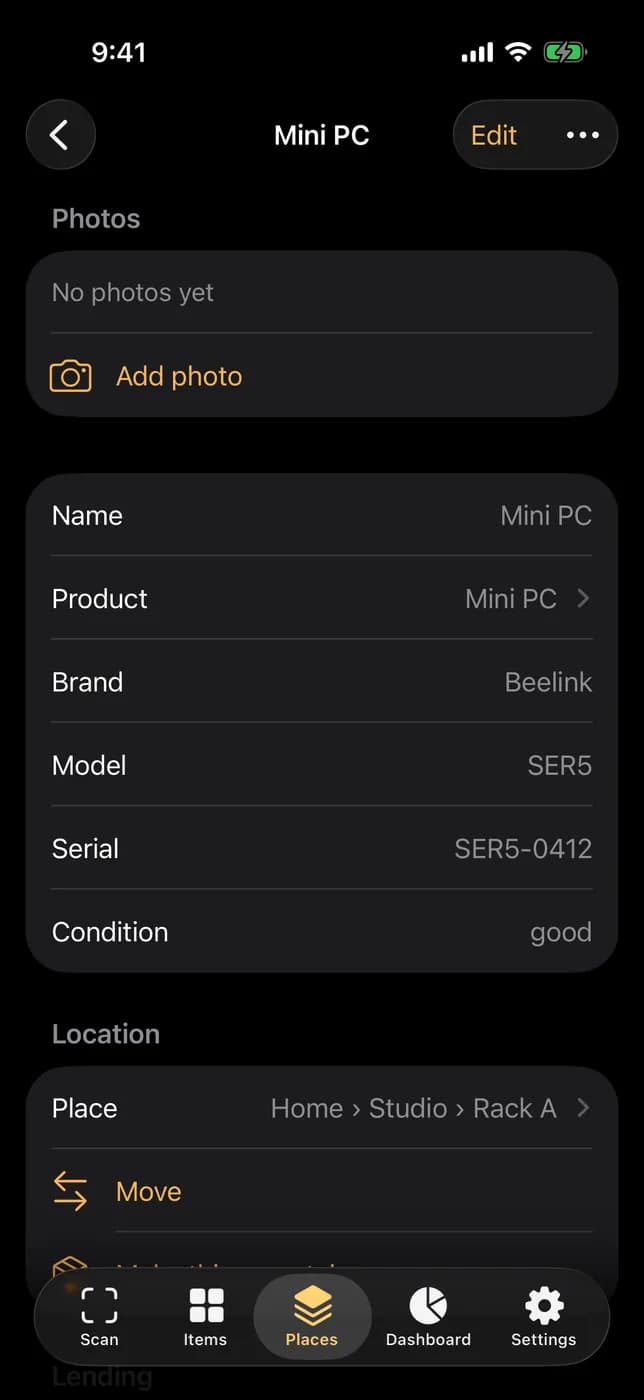
A mini PC with its serial number, condition, place and lending state. Two units of the same product are two rows; ten XLR cables are one row with a count.
03 / 04
Tags and the reader
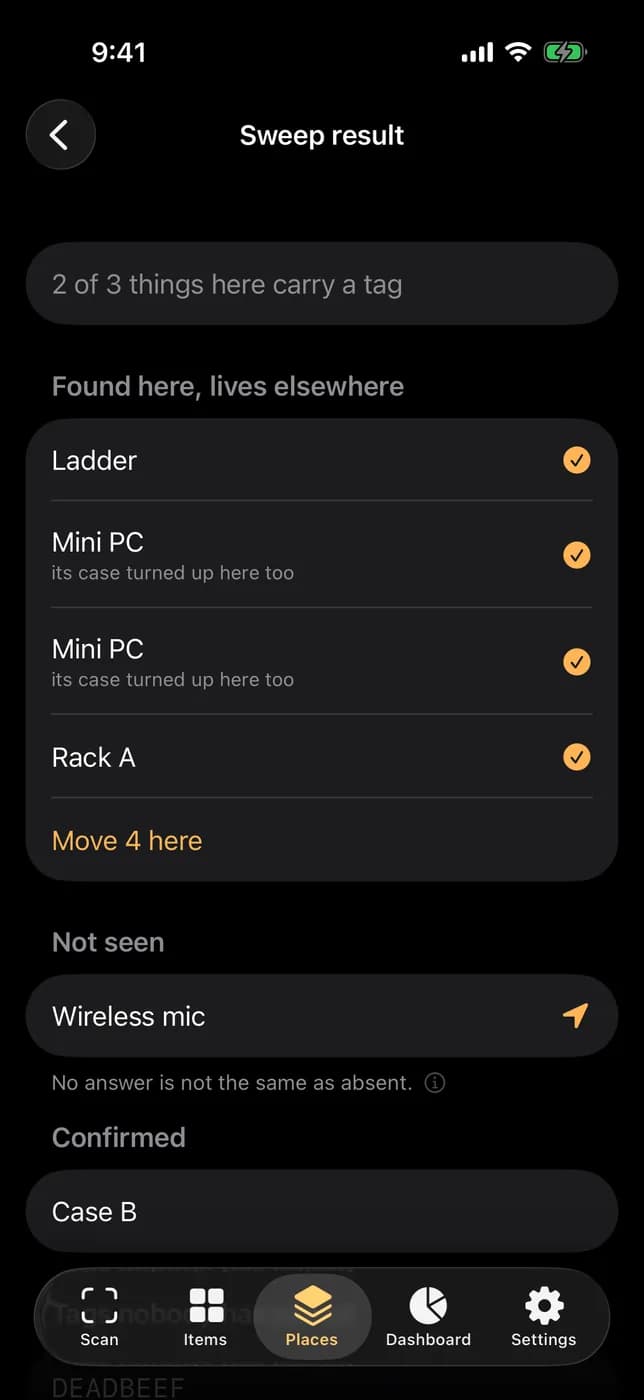
QR, NFC and UHF on any item or place. On the phone, a sweep of the van with the UHF reader sorts the result: confirmed, not seen, found here but living elsewhere, and tags nobody has paired.
04 / 04
Dashboard
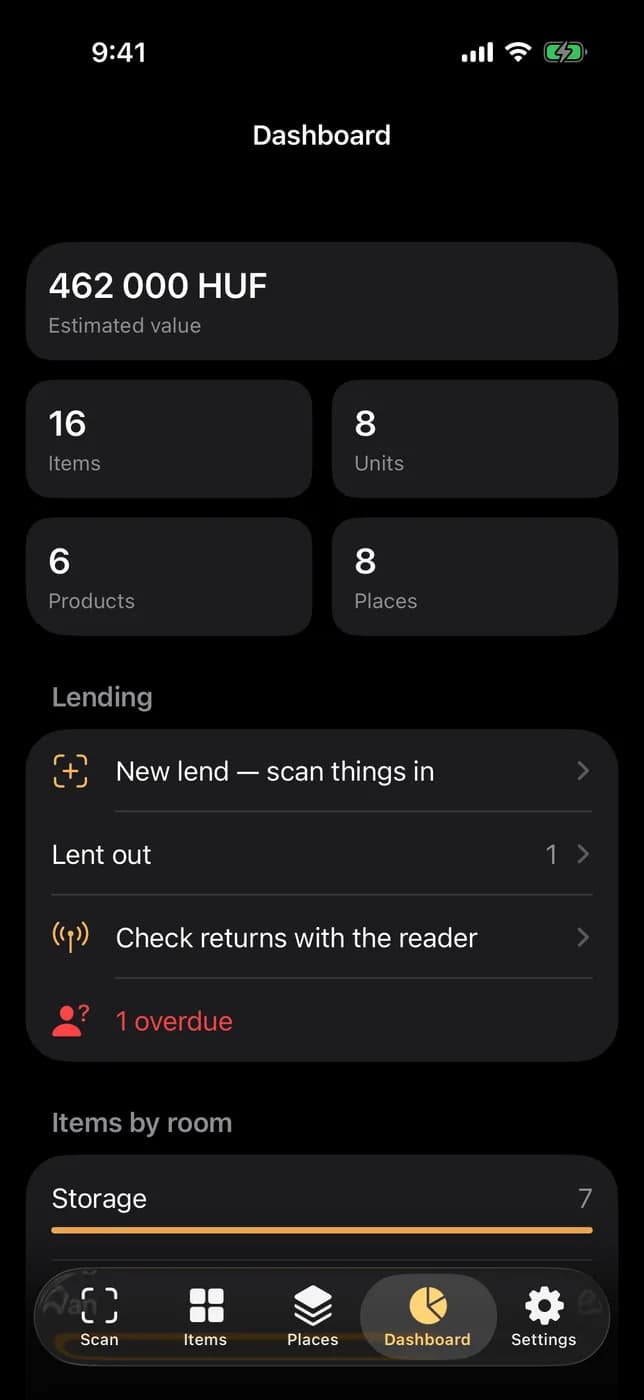
Estimated value, items, units, products and places, what is lent out and overdue, items per room. The web app on the server shows the same numbers.
iPad
The same app on the iPad
One native app for iPhone and iPad: every orientation, Split View, the same screens and the same vault.
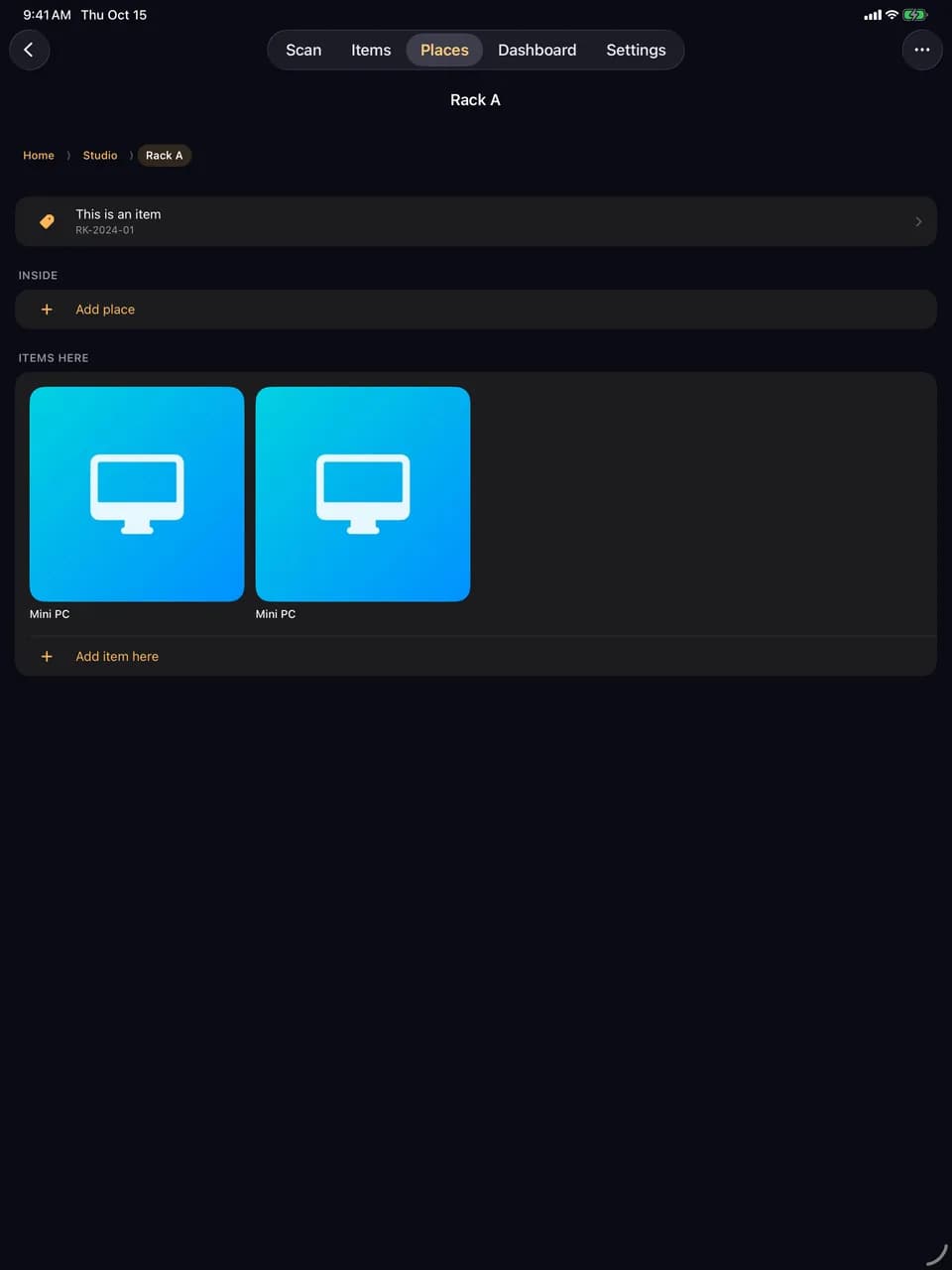
01Places
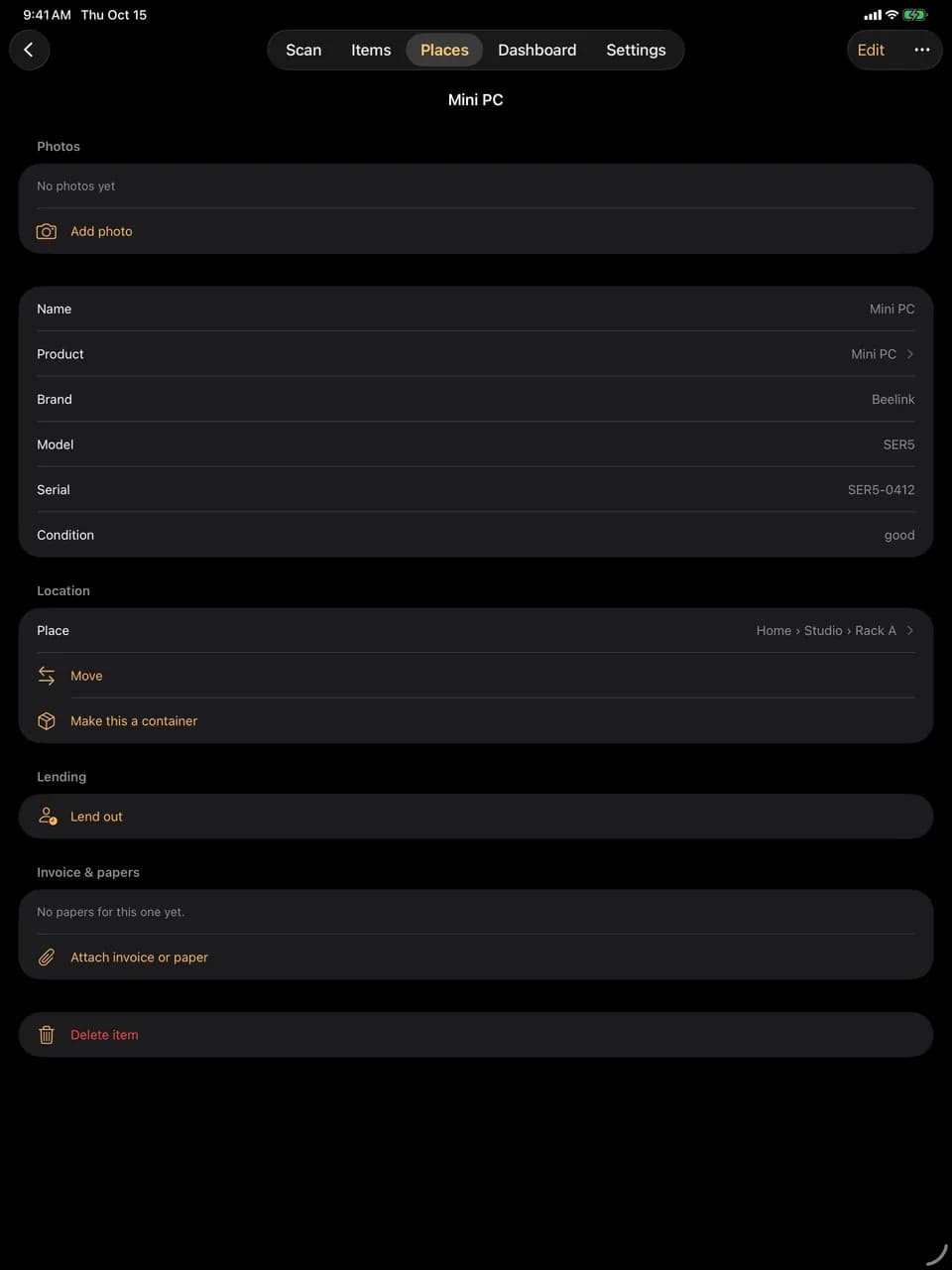
02Item
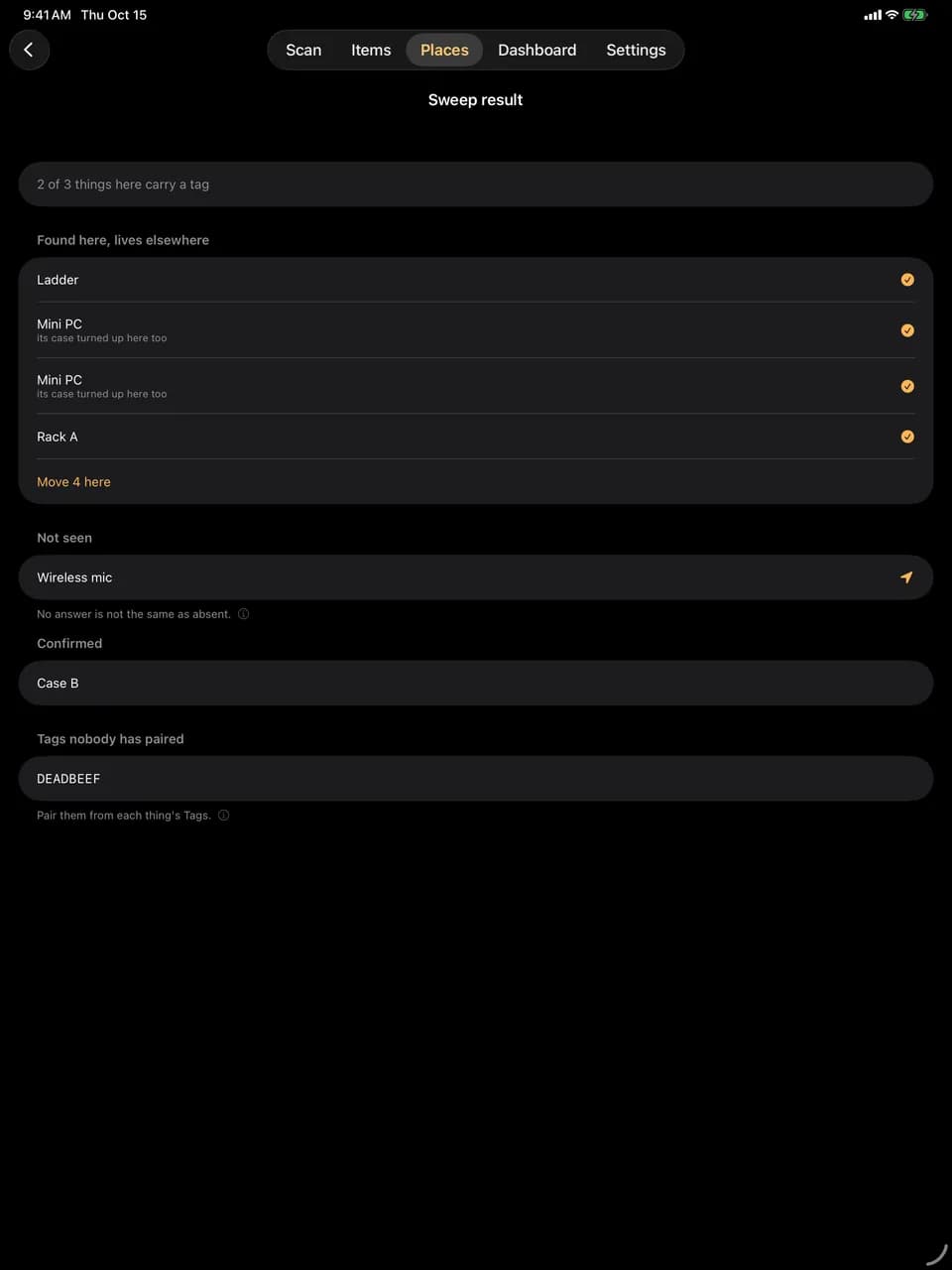
03Sweep result
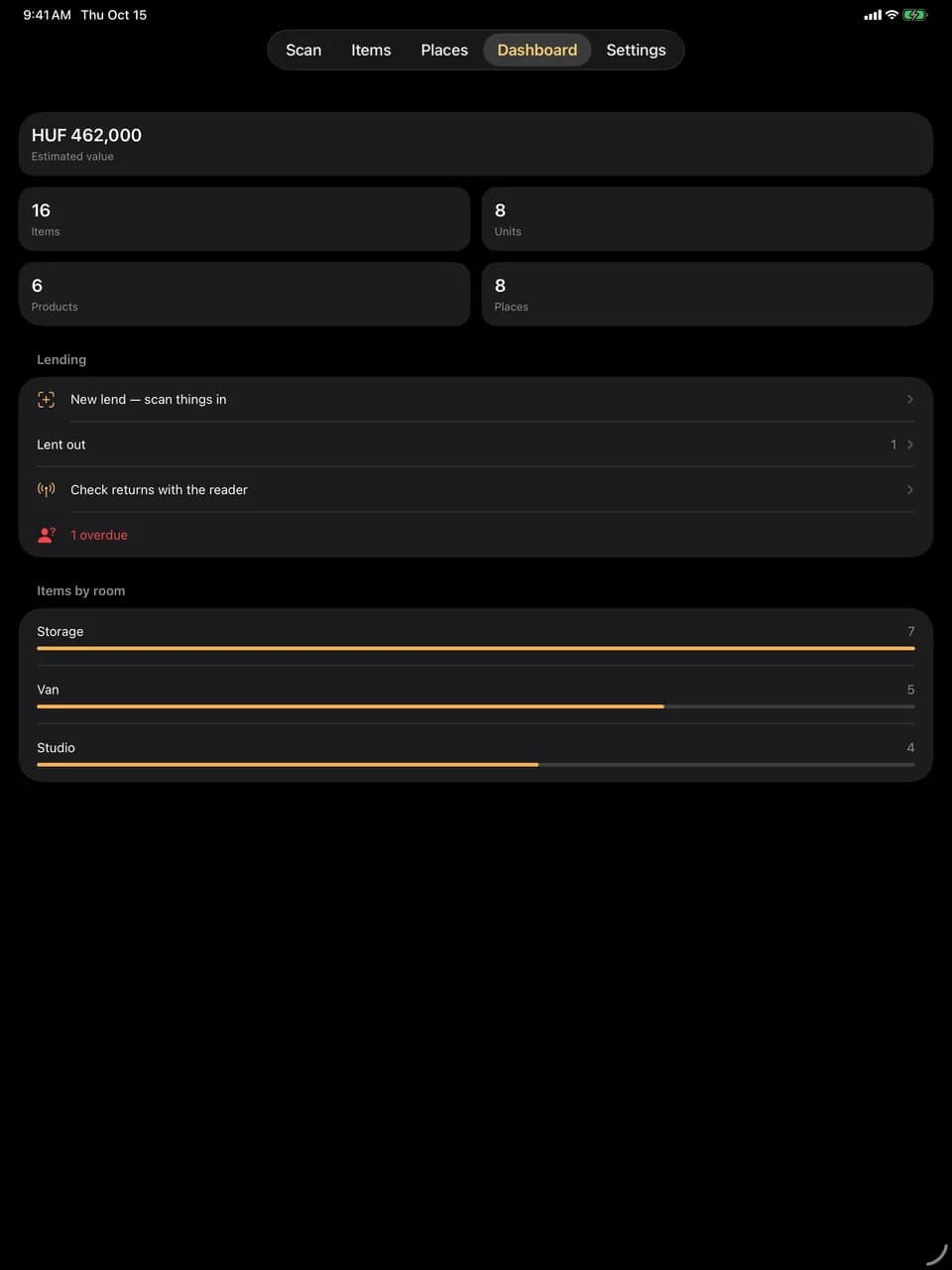
04Dashboard
Features
What it keeps track of
01
Places that nest
Location, room, shelf, rack, case, box, drawer, cabinet and other, nested as deep as your home or your van really is. A place can also be something you own: a flight case holds things and has a value, a serial number and a warranty of its own.
02
Products and stock rows
A product is the what: brand, model, EAN, category, dimensions, colour, material. A stock row is the where: so many of it in a place, as serialised units with their own serial number or as bulk stock with a count. Rows split, merge, move and grow in one step.
03
Photos and papers
Several photos and files on a unit or on the product itself, so a manual or an invoice is filed once and every unit has it. On the phone, full-size photos and PDFs can stay on the server once uploaded; the thumbnails and the search stay on the device.
04
QR labels
Every item and every place gets a QR code. The server prints Avery-style label sheets as PDF, the phone prints cut-out labels over AirPrint, and both open whatever they scan.
05
NFC and UHF tags
Pair an NFC sticker or a UHF RFID label with any item or place; each tag remembers its technology. Tap an NFC tag to open the record. With a Chainway R2 reader over Bluetooth, sweep a whole shelf from a few metres away, then let Locate walk you to the one tag you are after.
06
Lending
Lend a unit or part of a bulk row and the row splits by itself. Who has it, when it is due, what is overdue. A lend session scans things in one after another, and the reader checks what came back.
07
Search and dashboard
Full-text search across products and stock rows, scoped to a place and everything under it, with saved filter presets. The dashboard shows the estimated value, units per room, categories, warranty expiries and what is out of the house.
08
Sync and backup
Two-way sync with your own server keeps every device in step. Conflicts resolve last-write-wins and are logged, and anything the server refuses is listed with the reason it gave. Backup is a ZIP of the database and every file, or JSON and CSV.
Who it is for
At home
Everything you own: where it lives, what it is worth, who borrowed it and when the warranty runs out.
- No account and no sign-up: the app works the moment it opens, with everything on the device.
- The cellar, the attic and the storage unit have no signal, and the app does not mind.
- A QR label on a box or an NFC sticker on a shelf opens its contents in one scan.
- Warranty expiries and overdue loans show up on the dashboard before you miss them.
- The free tier does not expire: two rooms, five containers, twenty items and as many locations as you like.
In the van and the warehouse
Written for gear that lives in racks and cases and leaves the building.
- Racks inside rooms, cases inside vans, and a case that is itself an asset with a serial number and a value.
- Bulk stock with a count: ten cables on a shelf, four of them moved into a case, one row each.
- Sweep a rack or a van with the UHF reader and see what is confirmed, what did not answer and what should not be there.
- Lend a whole packing list by scanning it in, and check the returns with the reader.
- A door-gate API for a scanner at the warehouse door, and gear interchange with CrewCompass.
How it runs
One app, one optional server
The app is the product and works on its own. The server is a Docker compose file for a NAS or a home server, and it is what Pro syncs with.
iPhone
HomeVault app
Local-first and fully usable offline. Camera capture, QR and barcode scanning, NFC read and write, UHF sweep and locate with a Bluetooth reader, AirPrint labels, lending with the contact picker, pull-to-refresh sync.
iPad
The same app
Native on the iPad as well: every orientation and Split View, the same screens and the same vault, kept in step through the server.
Server · optional
Docker on your own hardware
PostgreSQL, the API and a web app with password login from one compose file, on port 7400 by default. The web app installs as a PWA, and the server also offers a 27-tool MCP server for AI assistants and a door-gate API for external scanners.
Availability
In beta on TestFlight
HomeVault is in public beta: install it from TestFlight on an iPhone or iPad running iOS 26 or iPadOS 26. The free tier is the whole app with limits on size. HomeVault Pro removes them and turns on sync with your own server; it is a subscription inside the app, monthly or yearly with a one-week free trial, and the price is shown in the app. Purchases in the TestFlight beta run in Apple's sandbox at no charge.
Free · does not expire
HomeVault
- As many locations as you like
- 2 rooms
- 5 containers: shelf, rack, case, box, drawer or cabinet
- 20 items
- Photos, papers, QR, NFC and UHF tags
- Search, lending and backup export
Subscription · monthly or yearly
HomeVault Pro
- Unlimited places and items
- Sync with your own server
- Every device, always up to date
- Everything you already added, unlocked
- One-week free trial
- If Pro lapses nothing is deleted: records over the free limit lock until it returns
HomeVault collects no data: there is no account, no analytics and no third-party SDK. Privacy policy