Show network · Switch console
SWCTRL
The MikroTik switches of a show network in one console, every value read from the switch itself.
A show network runs on a handful of switches in racks you cannot see from FOH. SWCTRL shows each one as a live front panel, lets you paint ports into VLANs, watches PoE, errors and link events, and tells you which cable a MAC address sits on. SwOS and RouterOS, from one interface. A rule I keep: nothing appears on screen that the switch did not report.
- Switches
- SwOS · RouterOS v7
- Platforms
- Web console · iPad
- Telemetry
- 1 Hz · WebSockets
- Licence
- 1 machine · perpetual
The console in the browser, the same fleet on the iPad
Captured from the built-in demo fleet: five simulated switches, marked SIM, with no real network behind them. Scroll, and the browser and the iPad follow the captions.
01 / 04
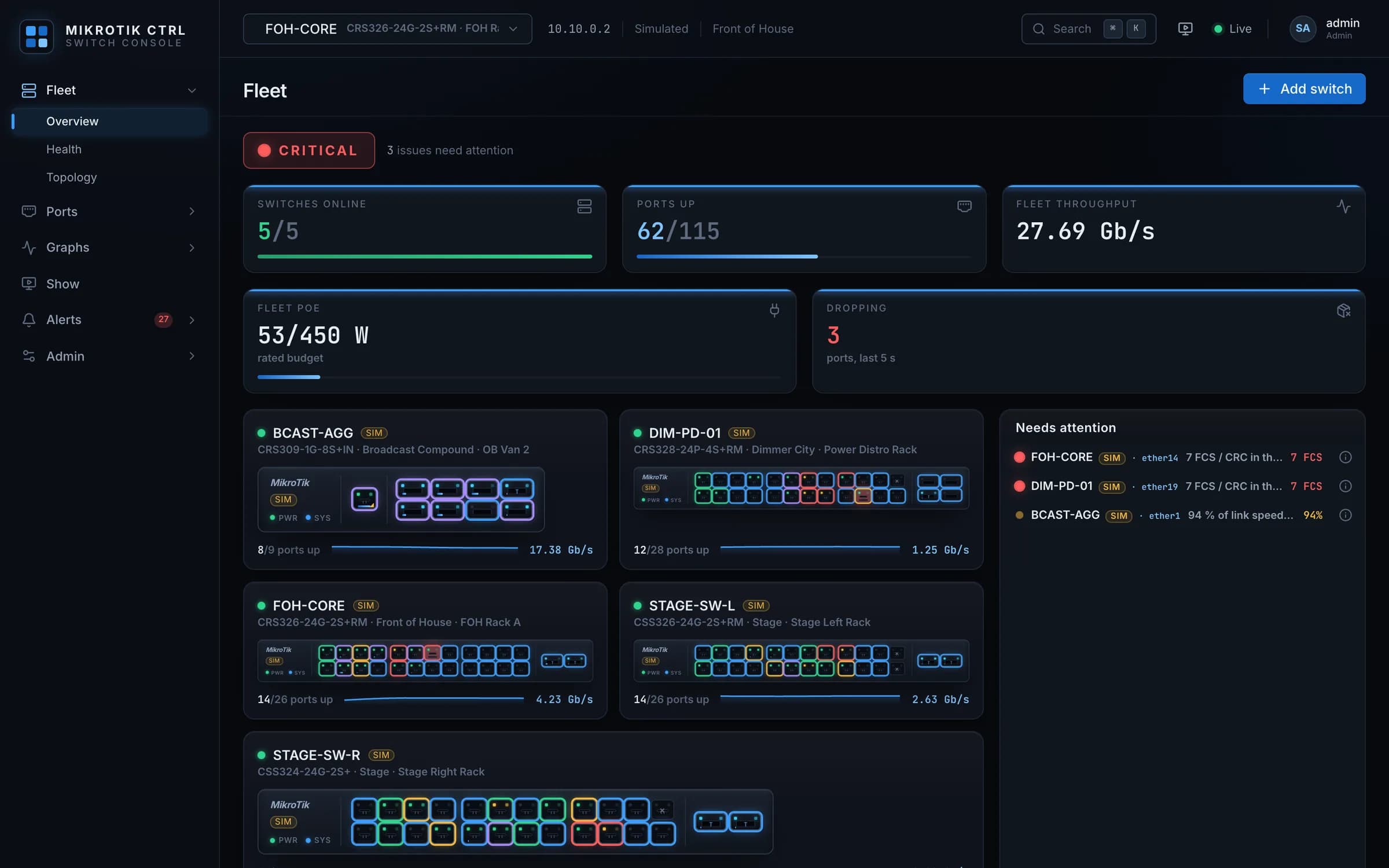
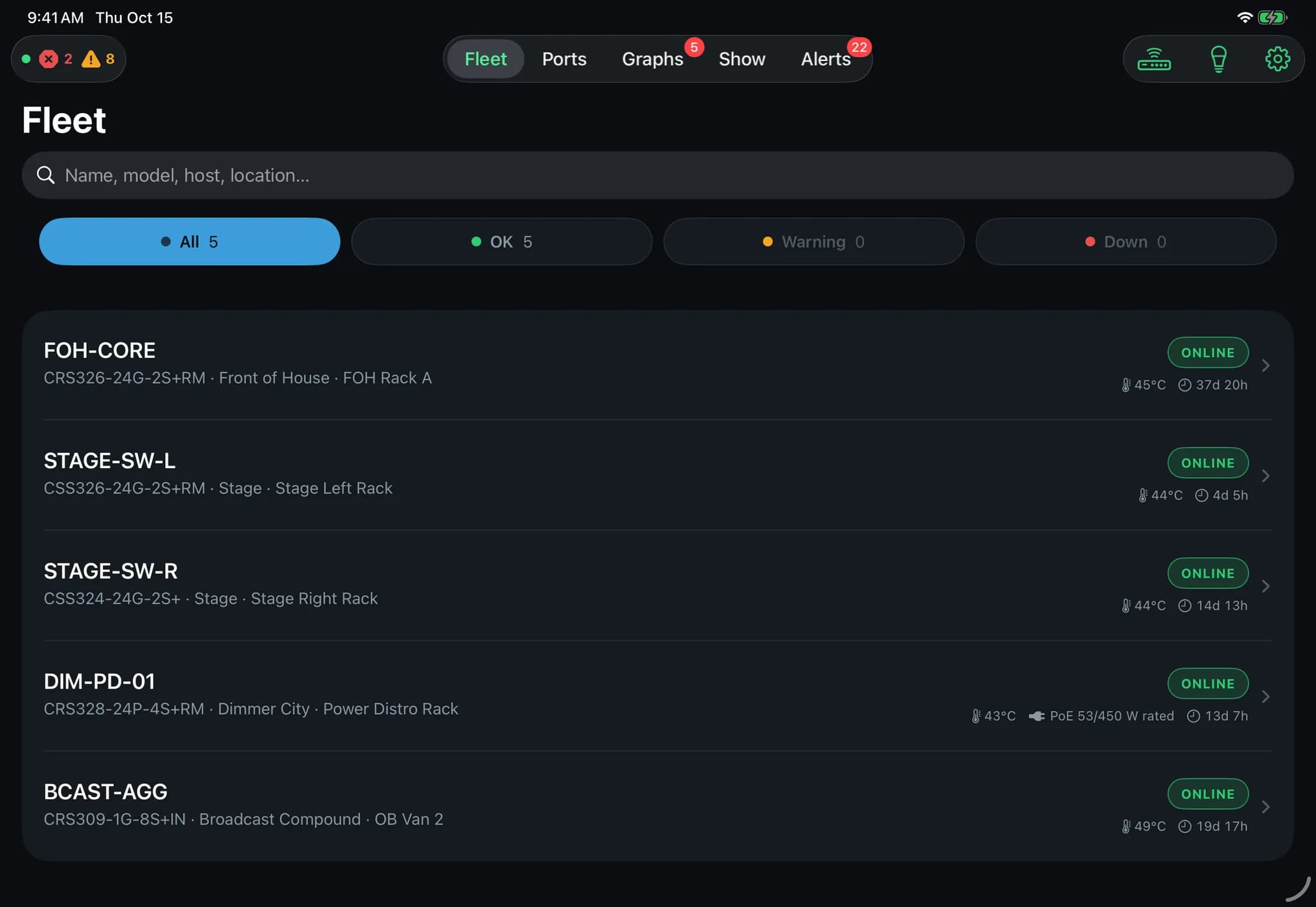
Fleet overview
Every switch as a live front panel with link, speed and errors per port, fleet throughput and PoE at the top, and the issues that need a hand first on the side.
02 / 04
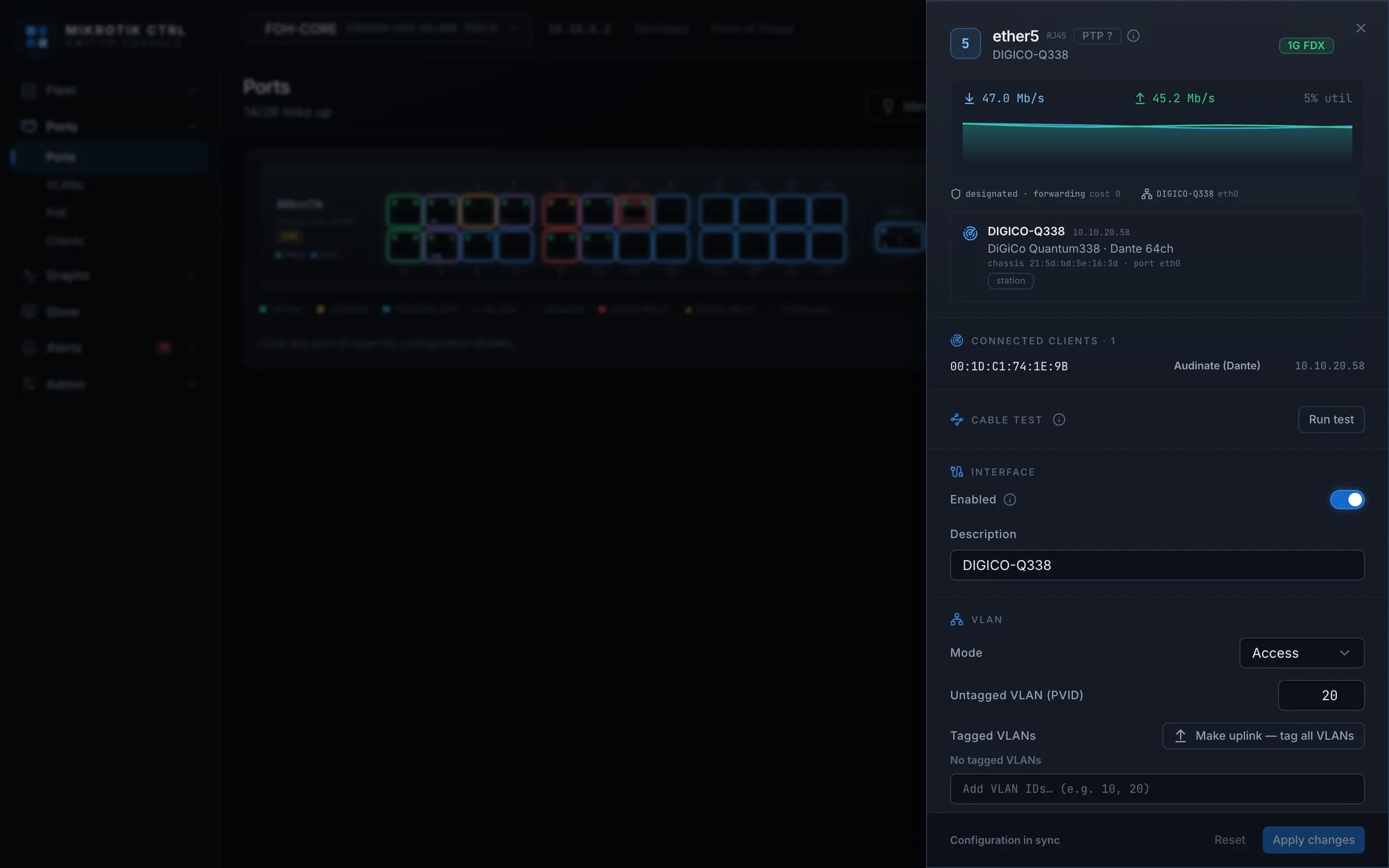
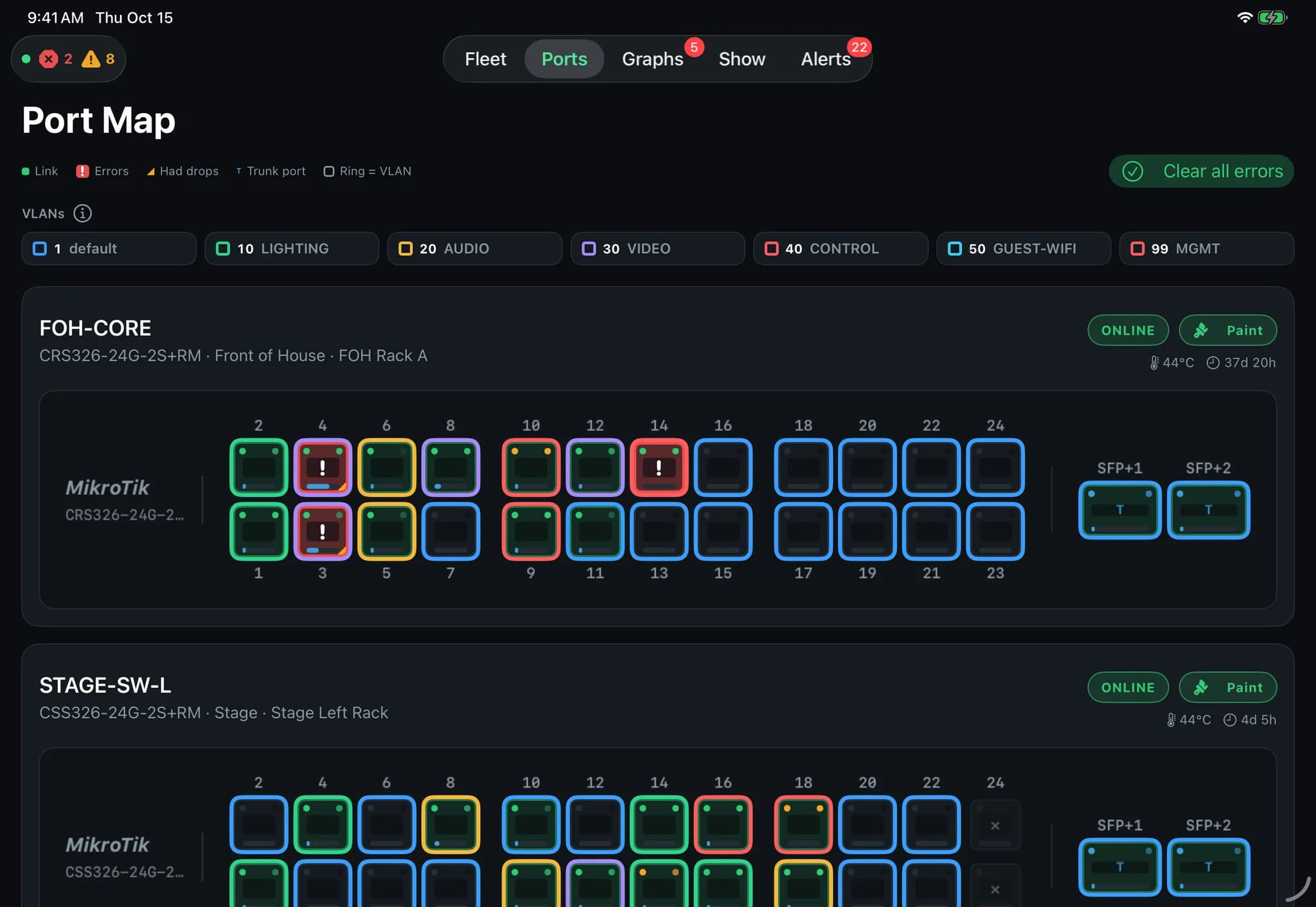
Port map and the drawer
Click a port for its drawer: rates, the client behind it, VLAN mode and PVID. The iPad draws the same map with the VLAN chips above it, ready to paint.
03 / 04
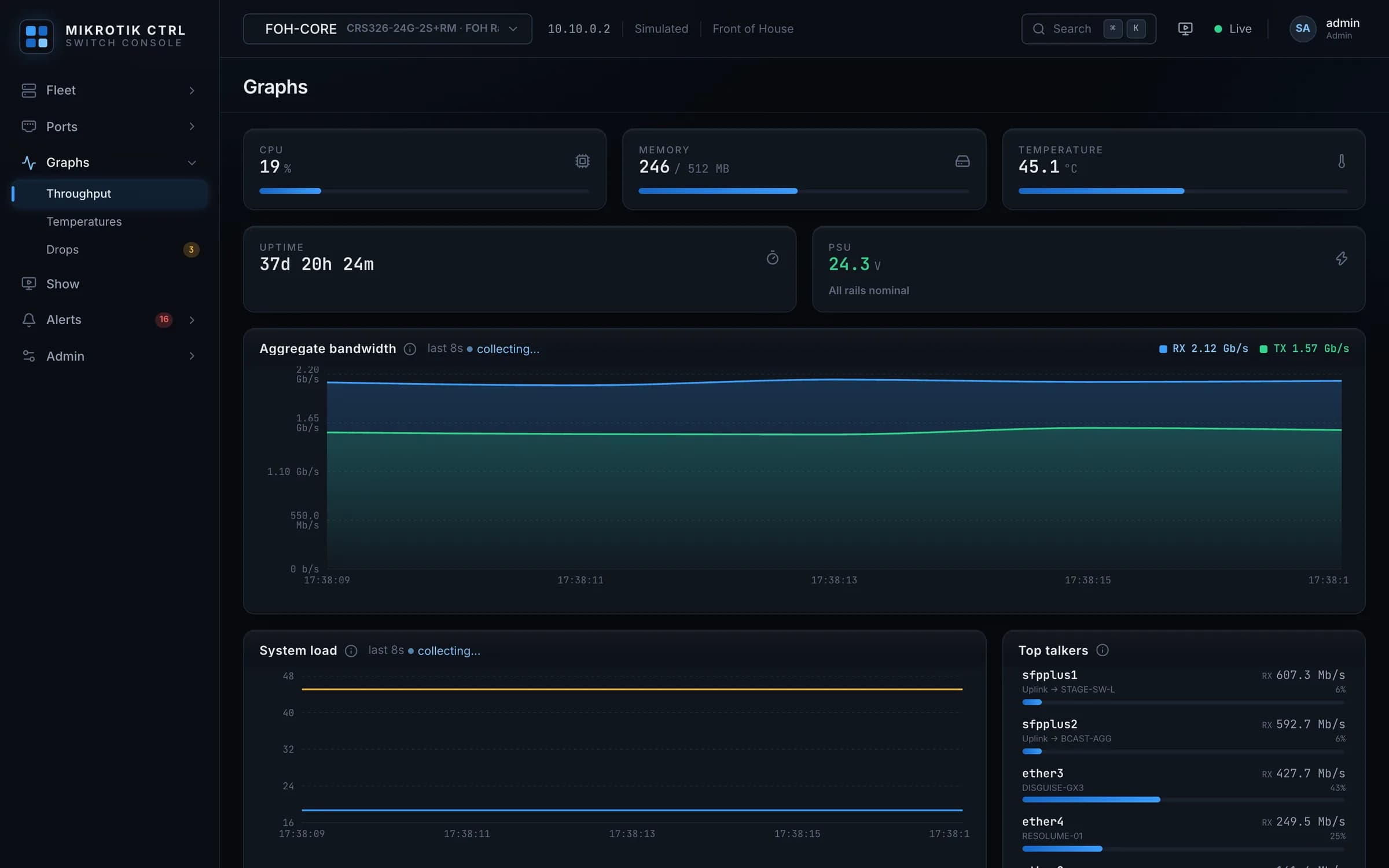
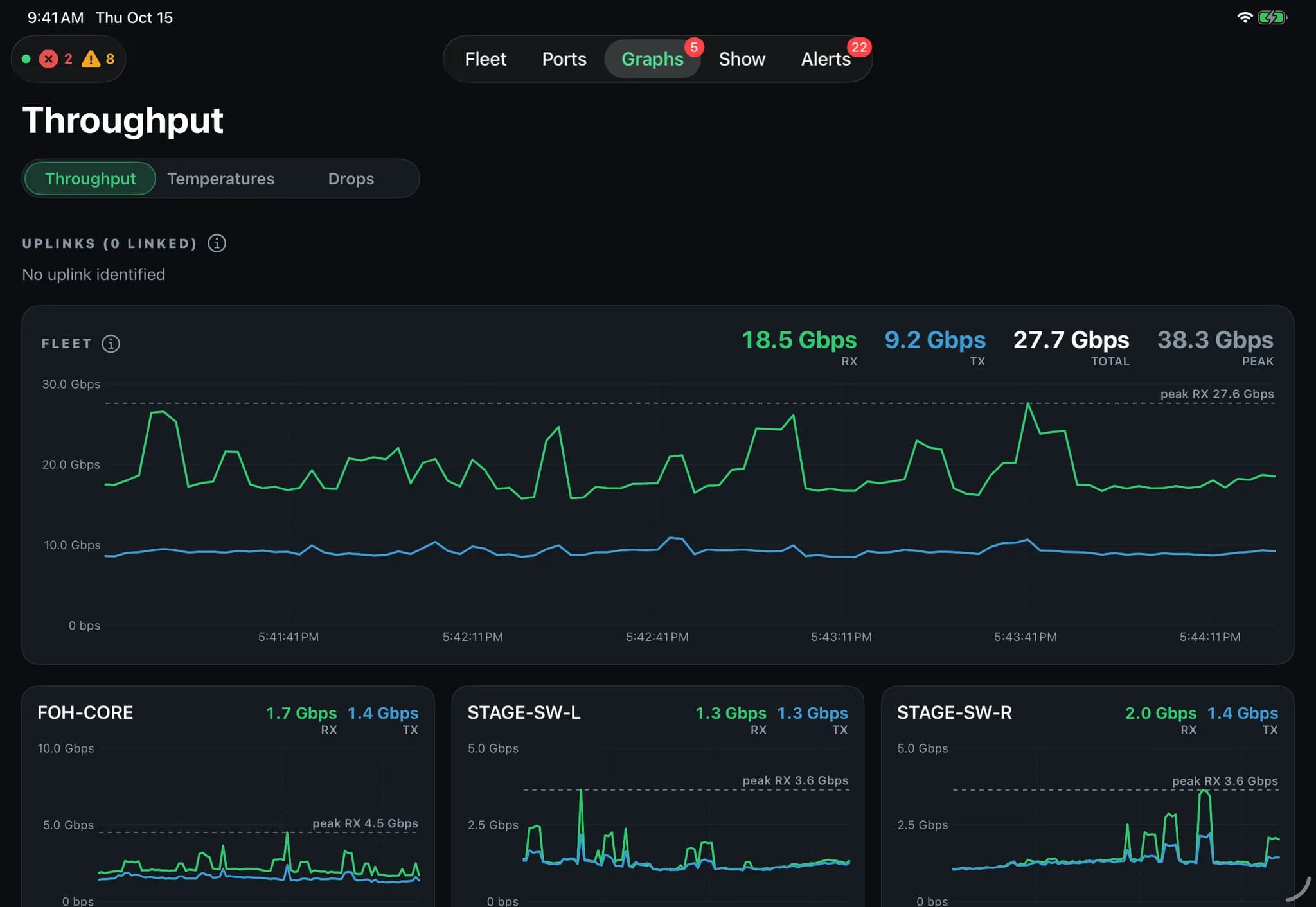
Graphs
Bandwidth, CPU and temperature history and the top talkers per switch, read from the switch's own API, with the fleet total on the iPad.
04 / 04
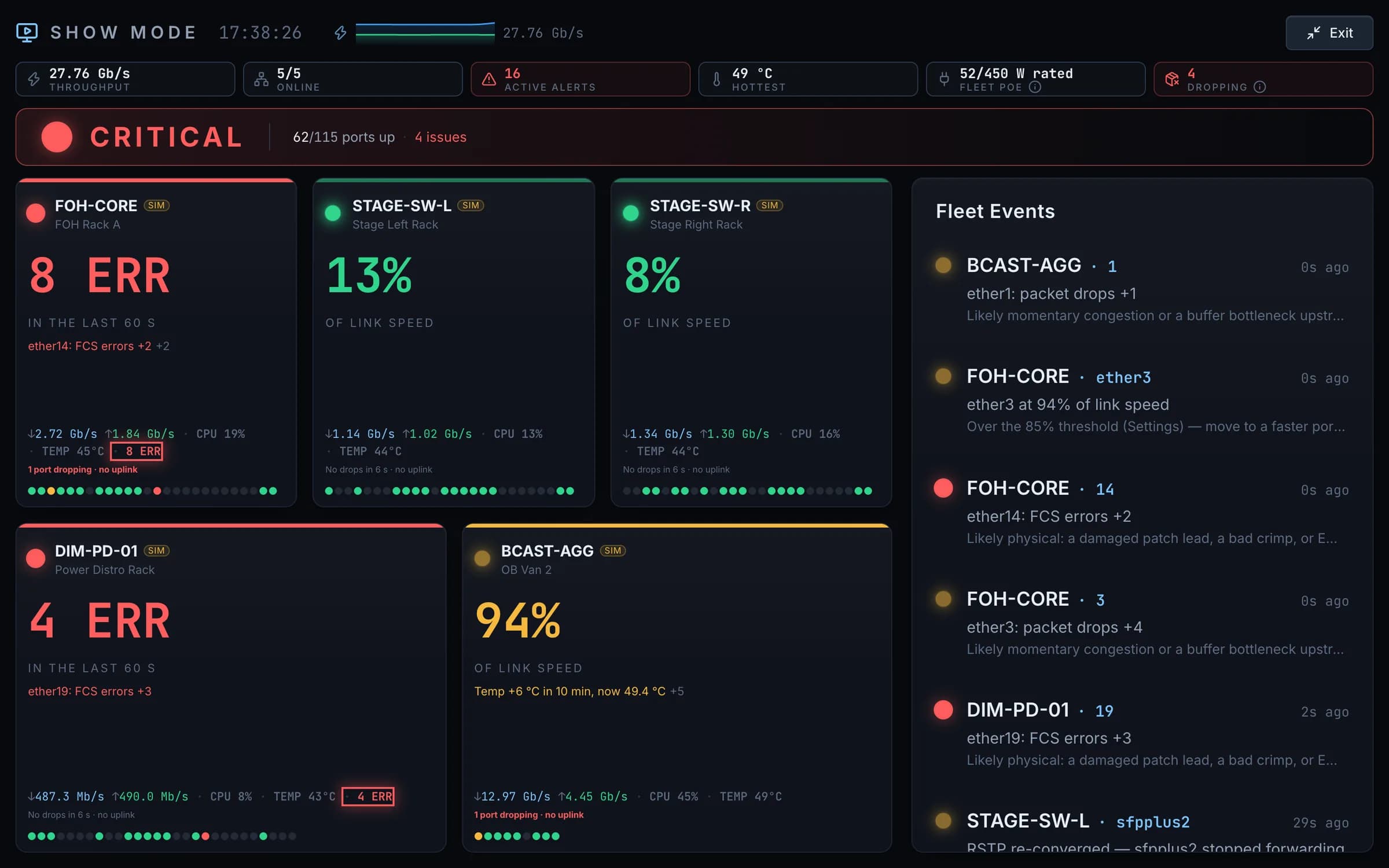
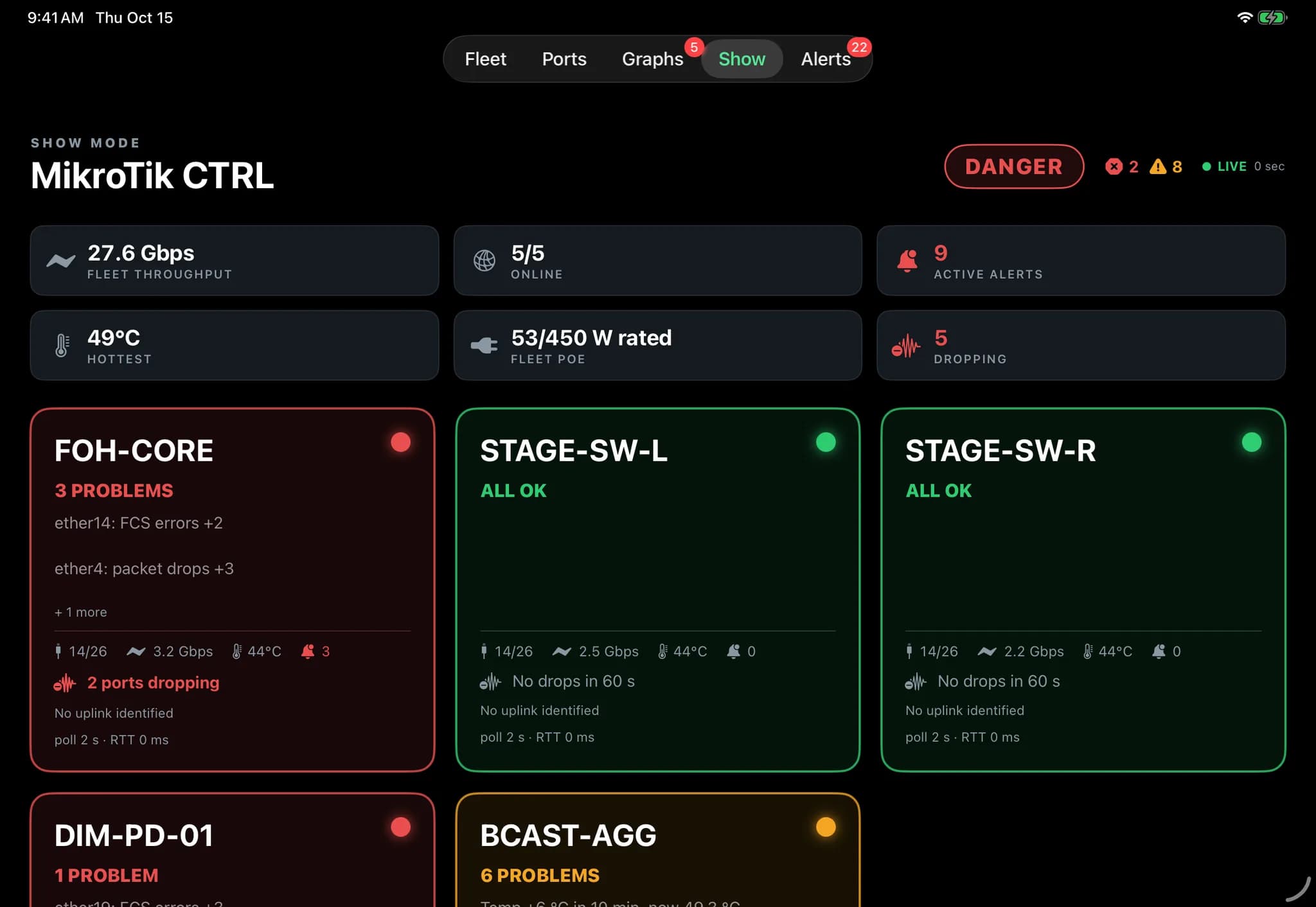
Show mode
One screen for the show: health per switch, errors in the last minute, ports dropping and the fleet event feed, readable from across the room.
Features
What the console does
01
Live front panel
Each switch is drawn with its own port layout: two-row copper pairs and SFP+ cages. Link LEDs take the negotiated speed, activity follows traffic, errors flash, disabled ports go dark. Hover shows the VLAN, the neighbour and the rates. The panel never shrinks; on a narrow screen it scrolls.
02
Port drawer
Enable or disable, description, VLAN mode with PVID and tagged set, speed and duplex, flow control, STP and edge, isolation, rate limits, storm control, PoE mode, mirroring. Live counters and an RX/TX sparkline next to the settings.
03
VLAN painting
Pick a VLAN chip and tap ports to put them into it. Trunk ports are protected from an accidental reassignment, and a paint is refused at the tap when the switch would refuse it at apply: a tag on an untagged-only port, a name longer than the switch keeps, a PVID move on a tagged-only port.
04
Monitoring
Bandwidth history, CPU and temperature charts, health gauges for CPU, memory, temperature, PSU, fans and PoE budget, top talkers and the full interface statistics. Device metrics come from the switch's own API, no SNMP needed.
05
Fleet
Switches grouped by location and rack, VLAN tables with a membership matrix per switch, live logs with tail, pause and filters, firmware channel and upgrade flow, configuration backups, user accounts and roles.
06
Clients and discovery
Every driver exposes the hosts a switch has learned, with MAC vendor names from a built-in OUI table. A fleet-wide search locates a MAC and jumps to its port. MikroTik neighbour discovery runs all the time; a found switch is added with one click. Identify flashes a switch's chassis LEDs so you find the unit in a rack of identical boxes.
07
Error diagnosis
When a port's error counter rises, a toast names the likely cause: collisions suggest a duplex mismatch, FCS errors a bad cable or interference, SFP+ errors a transceiver to reseat. Each alert opens the port, and a port is quiet for three minutes after one.
08
Topology
Switches and the clients behind them, built from LLDP and the forwarding tables, with no guessing: a link is drawn only when both ends prove it, one-sided evidence is dashed, a blocked redundant leg stays a stub instead of a line to a guessed peer, and several addresses on one port become one unmanaged-box node.
Who it is for
At the rack
What you want to know standing in front of the switch, in the shape the switch reports it.
- Every switch as a live front panel, with link, speed and errors per port.
- A MAC address found across the fleet, with the port it sits on opened in one step.
- VLAN painting that refuses at the tap what the switch would refuse at apply.
- Identify flashes the chassis LEDs, so the right unit is found in a rack of identical boxes.
- Device metrics come from the switch's own API; there is no SNMP agent to set up.
On the show day
Built so that the console is never the thing that takes the network down.
- One process on one port, and it never restarts on a file save. The dev mode with its file watcher is for the office.
- Bound to the management NIC only, if you want, so the console stays off the audio and lighting VLANs.
- A management guard: a port disable, a PVID move or a VLAN delete that would cut the console's own path to a declared management port or VLAN stops with a warning, and goes through only when confirmed.
- The iPad finds the server over Bonjour; nobody types an address.
- Rehearse without hardware: a folder of SwOS backup files boots as a fake fleet on the real driver, and every write stays on that machine.
How it runs
One server, two screens
One Node process serves the API and the built console on one port, as a Docker image or plain Node. The browser and the iPad app talk to the same server.
Browser
Web console
The whole console in the browser: fleet, ports, graphs, show mode, alerts and admin, with 1 Hz telemetry over WebSockets that reconnects on its own.
iPadOS · in testing
iPad app
Finds the server over Bonjour and shows the same fleet: front panels with a port popup, VLAN painting with the same refusals as the web console, PoE, throughput and temperature history, switch events and the LED panel controllers.
Server
Docker or Node
A two-stage Docker image with a health check and a non-root user, or plain Node. Discovery over UDP broadcast needs host networking, which the compose file shows. State lives in a few JSON files, no database.
Licence · 19 990 Ft
One machine, paid once
A licence is perpetual and covers one machine, the server the console runs on. On first start the console asks for the key and activates it against my licence server, then rechecks hourly with fourteen days of offline grace, so a rig in a venue without internet keeps running. For a fully offline show rig a copy of the licence server can run locally. The price is final: the seller is VAT-exempt under the Hungarian small business scheme, so no VAT is added.
SWCTRL is an independent product, not affiliated with, endorsed by or sponsored by MikroTik. MikroTik, RouterOS and SwOS are trademarks of their respective owner.
Other products
- CrewCompassevent and tour management for production crews →
- DMX GatewaysACN ↔ Art-Net for show networks →
- Cue Monitora cue countdown on show timecode →
- TourTaglabels for touring gear, in exact millimetres →
- HomeVaultan offline-first inventory for iPhone and iPad →
- ROGGERa free Resolume remote for the ROG Ally X →