Show calling · Timecode
Cue Monitor
A countdown to the next cue for every crew position, running off the show's own timecode.
I built it for pyro first. The server reads SMPTE timecode from the audio input or from Art-Net and takes the cues from the grandMA3 timecode export. The iPad shows what comes next, how long until it does and how long it stays open, in a ring coloured by type: flame, CO₂, spark, confetti. Camera operators and moving-head calls can get their own lanes, and every hold-to-test output has a dead-man behind it.
The demo runs a fictional show in simulation, in the browser, no install.
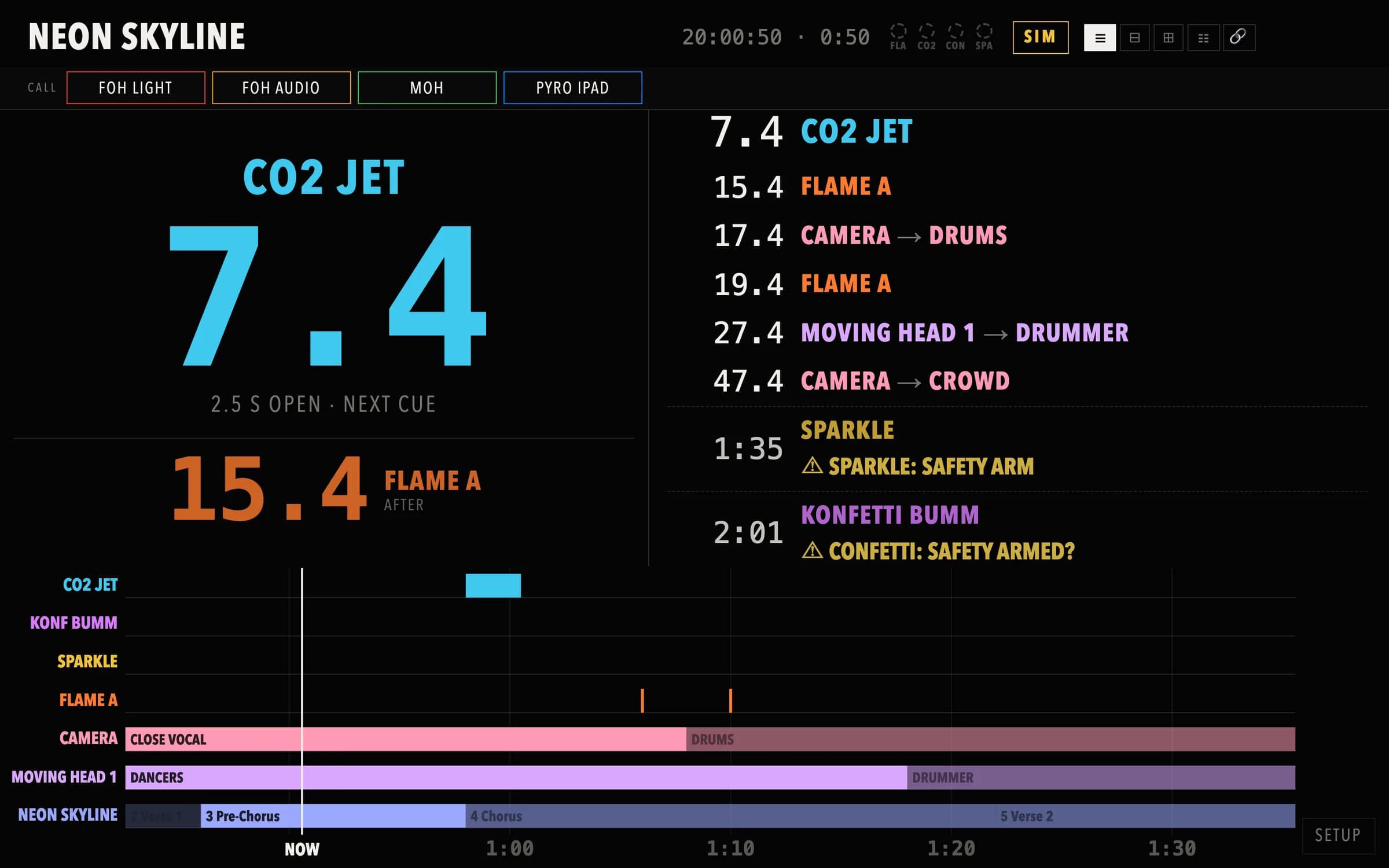
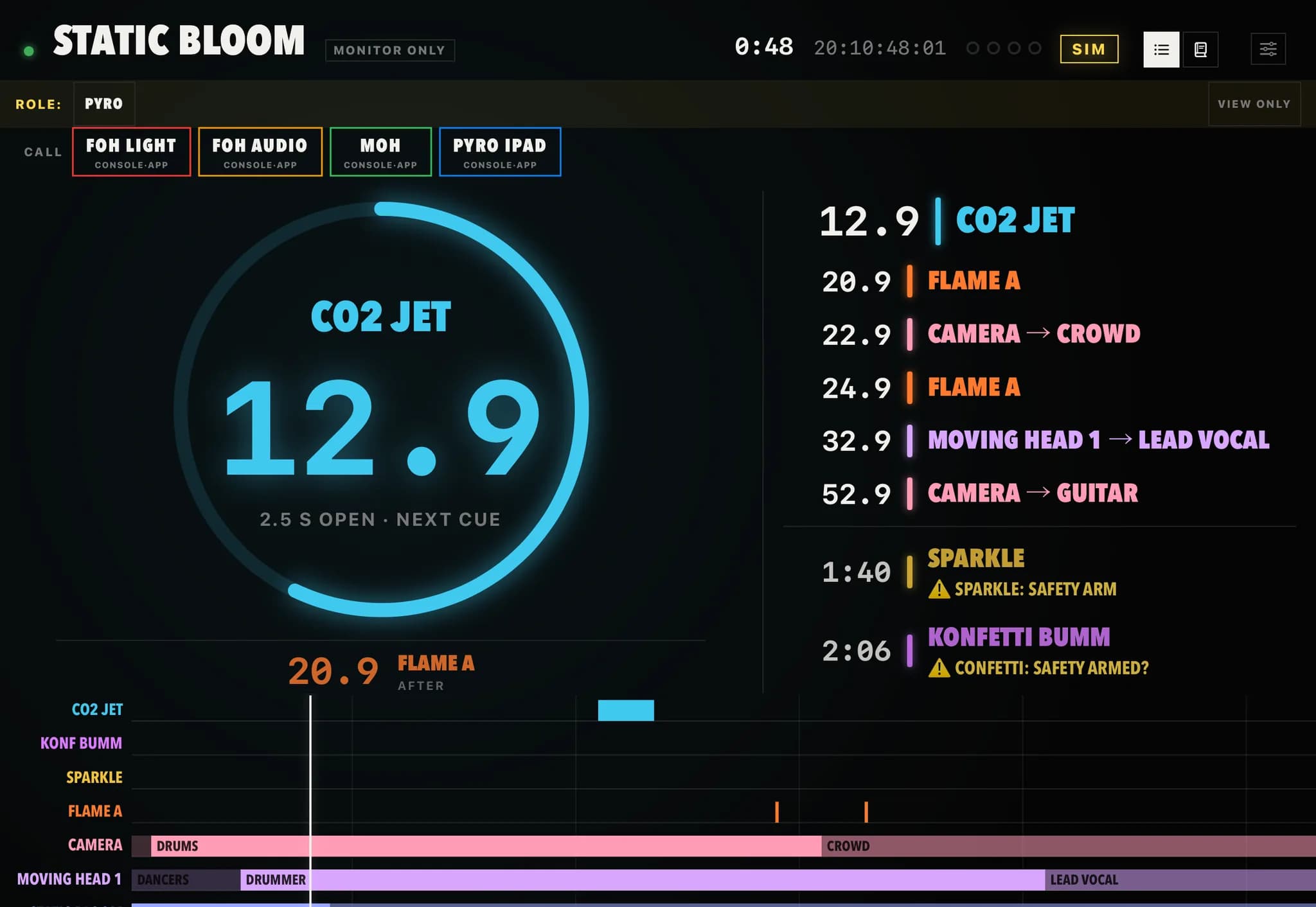
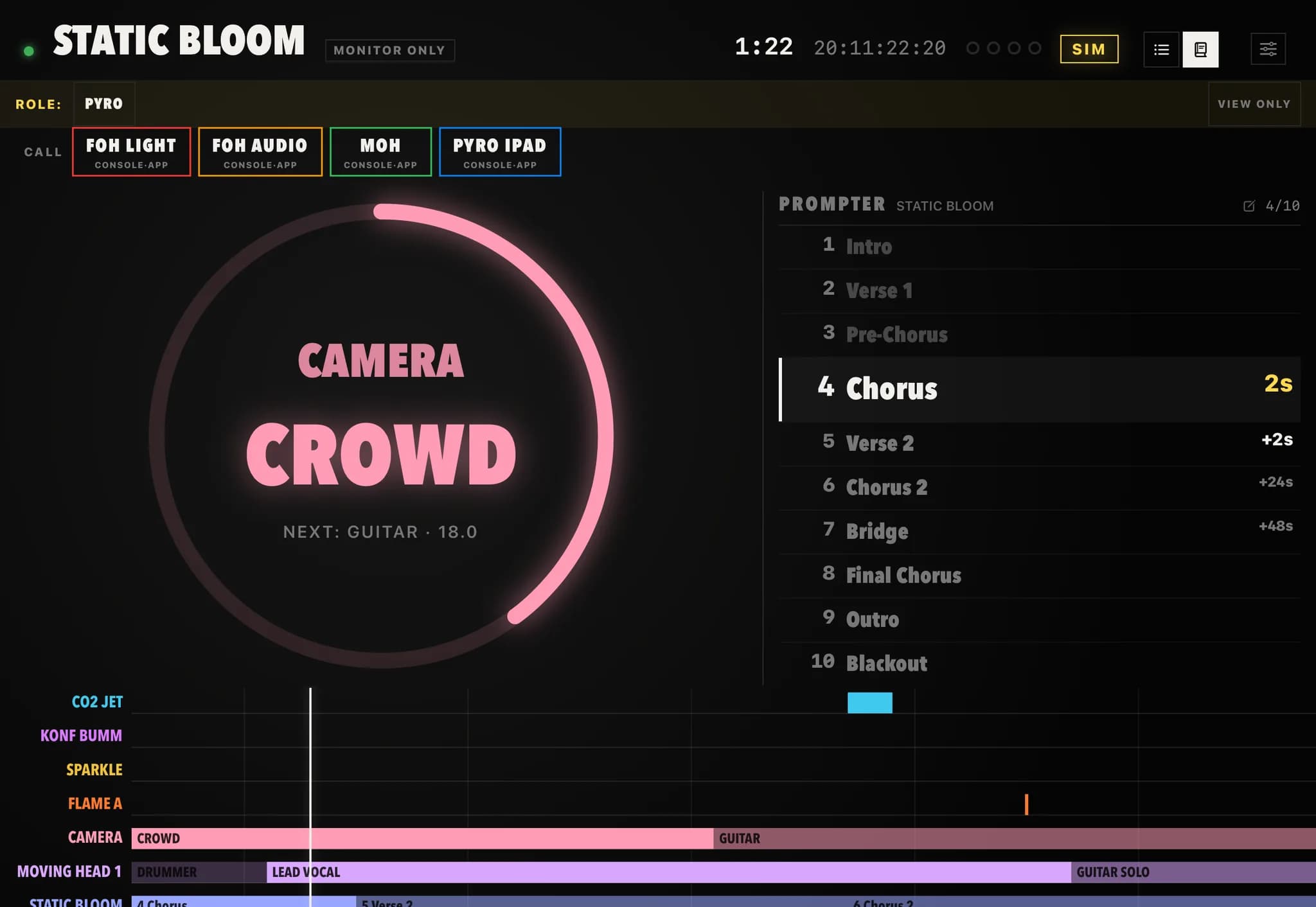
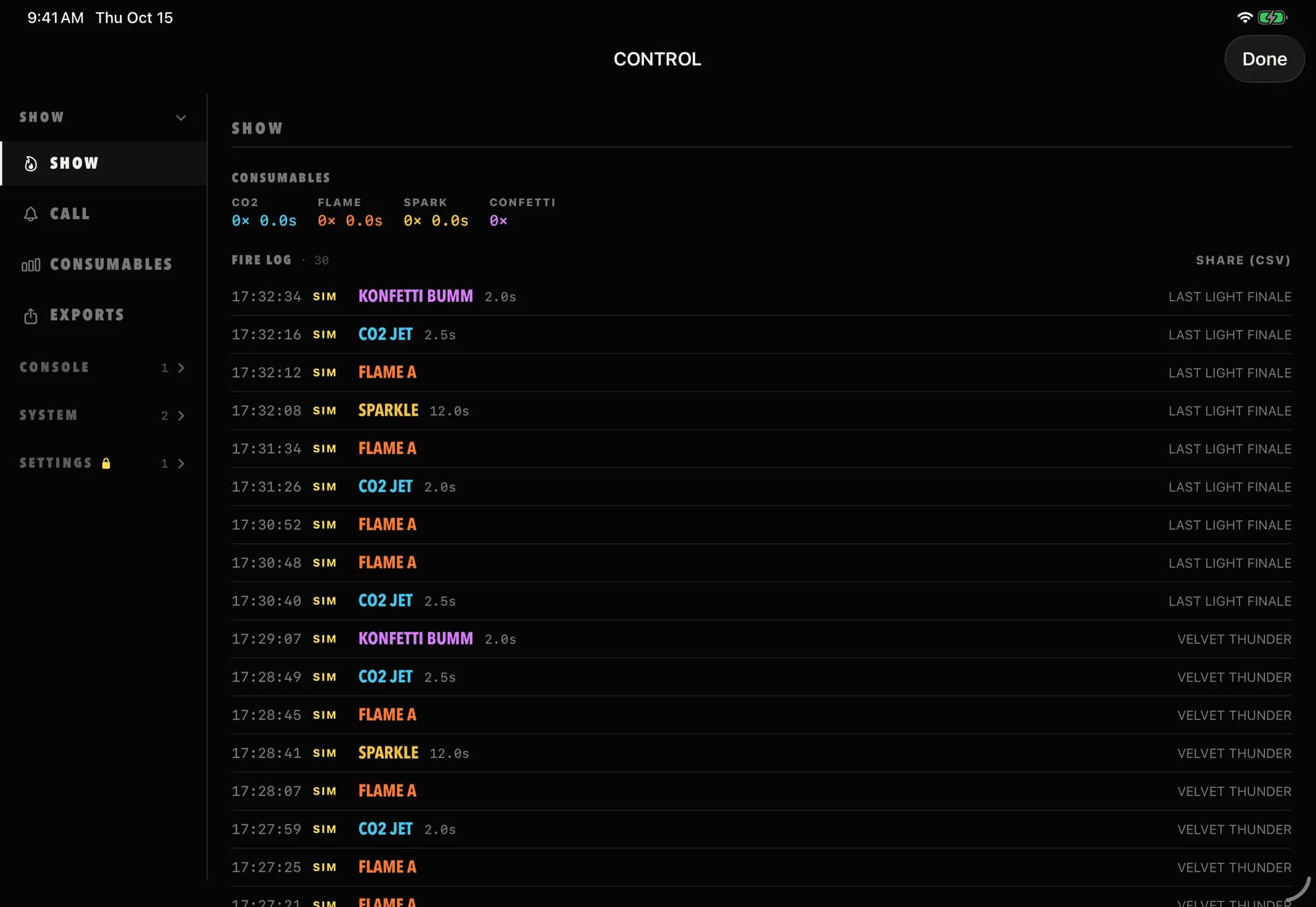
The countdown in the browser and on the iPad
Captured from the public demo, which plays a fictional show in simulation around the clock. Scroll, and the browser and the iPad follow the captions, or open the demo and watch it count.
01 / 03
The ring and the next cue
The next cue for your position, counted down to the tenth of a second and coloured by type, with the cue after it underneath so you can see how much room you have. The timeline below runs in lanes.
02 / 03
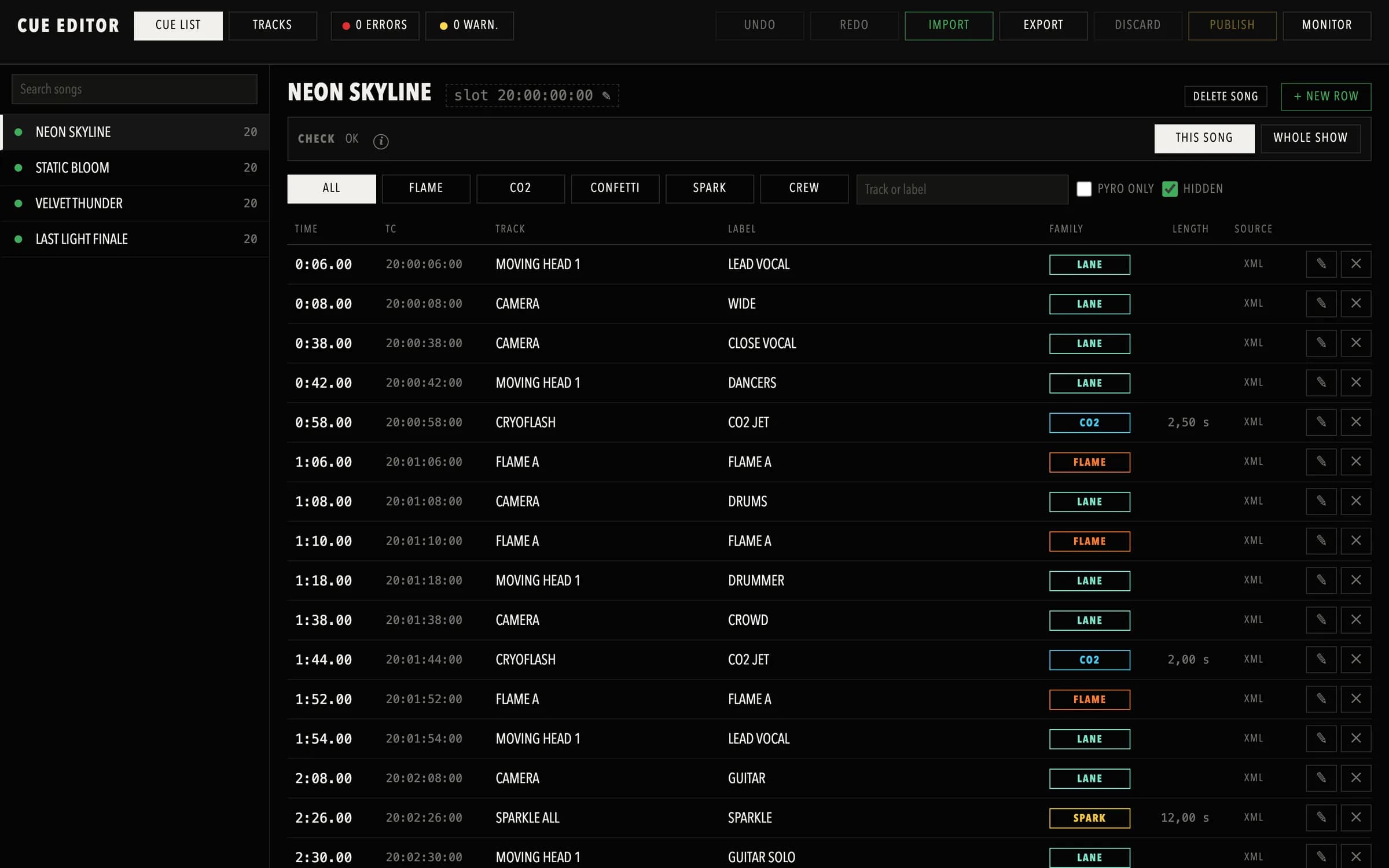
Prompter and cue editor
The iPad can show a song's sections as a prompter next to the ring. In the browser, the cue editor lists every row with its time, track, label and family, and checks the show before it goes live.
03 / 03
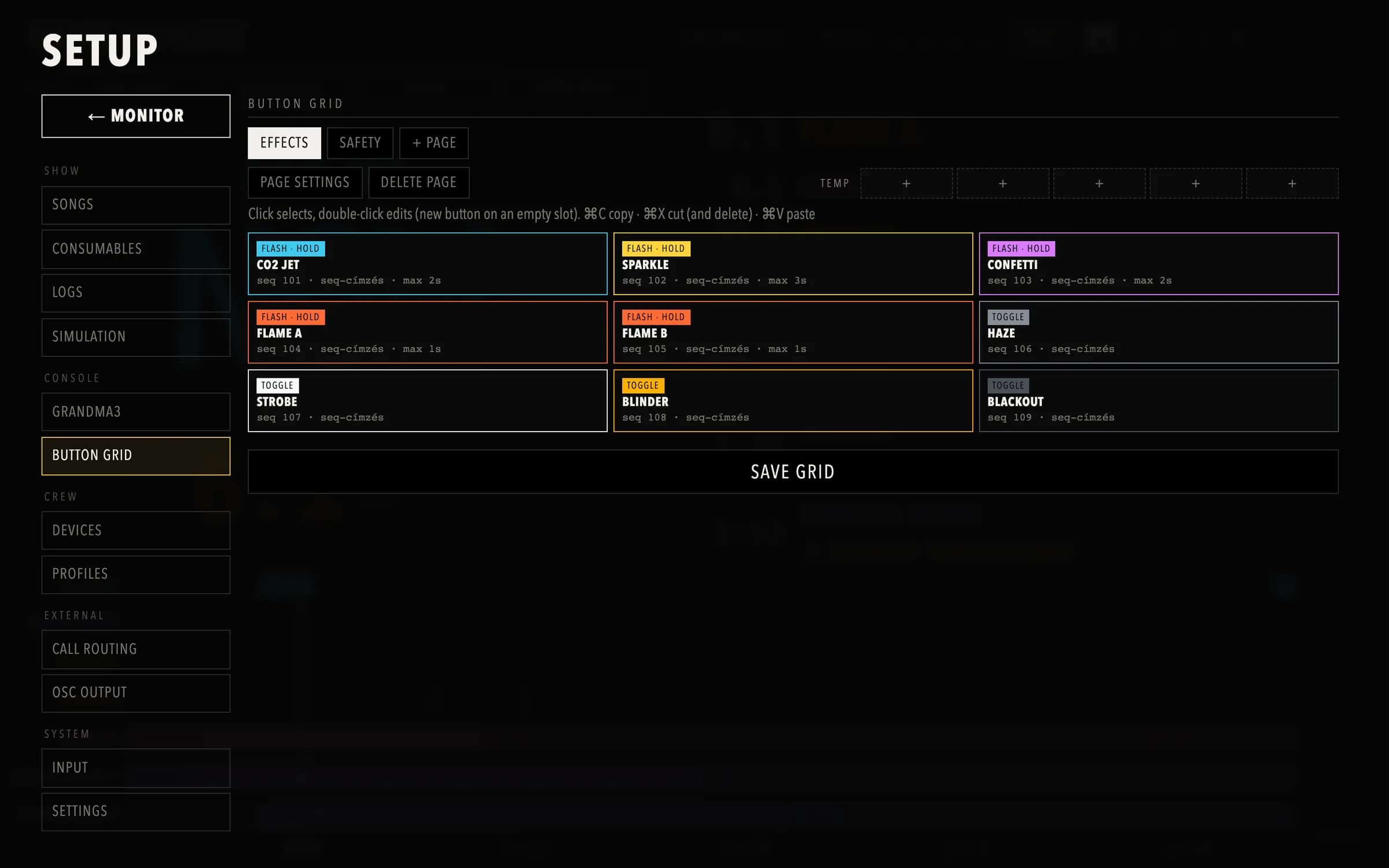
Button grid and fire log
Hold-to-test and toggle buttons are built in the browser, page by page, each tied to a console executor. The iPad's control panel shows consumables and the fire log of everything that went out.
When the link drops, outputs close
A display next to a flame line has to fail safe. Most of the design work went into what happens when the Wi-Fi drops or a hand leaves the tablet.
The dead-man covers your own button grid. A button pressed on the console's built-in Web Remote is a plain console press, so that path is the console's responsibility, and the page says so.
Hold to fire, let go to close
A test button keeps its output open only while your finger is on it. Lift off and it closes immediately. There is no toggle state to remember.
300 ms of silence and it shuts
While you hold, the app keeps sending a heartbeat. If the Wi-Fi drops or the app freezes, the heartbeat stops and the server closes the output within 300 ms on its own.
Armed means the console said so
A button without fresh feedback from the console is never shown as ready. It goes grey and gets a question mark until the console reports its state again.
Link and battery on screen
A dropped connection shows as a red bar and reconnects by itself. Below 20 % battery the app warns you, well before the tablet shuts down.
What you see during the show
The main screen answers two questions: what is next, and how much time is there between this cue and the one after it.
The ring
The ring counts down to the next cue and takes its colour. The number is accurate to a tenth of a second and flashes for the last five, and an iPhone vibrates with it. Below the ring is the time of the cue after that, so you can see at a glance how much room you have.
A timeline in lanes, with your notes
One lane per track or role, with a fixed NOW line and events arriving from the right. A single shot is a thin line, something that stays open is drawn as long as it lasts. Cues you asked to be warned about blink yellow for the lead time you set, and your notes sit next to each one.
Timecode from audio or Art-Net
The server decodes LTC at the rate the sound card runs, from 44.1 up to 192 kHz, without resampling. A meter per channel shows where signal arrives, and you can switch channels without a restart. If you don't know which input carries timecode, the LTC search goes through the channels and stops at the first valid frame. Art-Net timecode works as an alternative source.
The console on the side panel
The side panel can show the grandMA3 Web Remote with your own layout and its real state colours, or your own button grid of safety switches and hold-to-test buttons, each showing what the console reports back. Cue Monitor can also send OSC to a cue light or to Companion.
It counts what actually went out during the show: CO₂ blasts, sparks, confetti and the seconds anything stayed open. Every crossed cue goes into a fire log, every signal drop and input change into an operations log, and both can be printed. Rehearsal runs in simulation mode are left out of both.
Cues from the console, or from a list
Put the grandMA3 timecode XML export into the xml/ folder or upload it in the browser song manager. The server reads it within a second and matches songs by their timecode slot. You choose which tracks show on the display and can set an offset per song. Broken or empty exports are listed before the show starts.
Crew cues that never live on the lighting desk can come from REAPER markers or from a CSV or Excel cue list with times, names and roles.
Setup from the tablet
You build the button grid on the setup page: which button calls which executor, in what colour, as a switch or as a hold-to-test. Input and channel are chosen with a live meter in front of you, and the sample rate can be fixed by hand. To connect the console, the server generates a small grandMA3 plugin. You paste one command line on the desk, and the plugin sets up OSC on a free slot and reports back. The server itself can stay in the rack.
Running the server
The app is only the display. The server listens to timecode and holds the show, and it runs on a Mac or on a Linux mini PC in the rack.
macOS · Apple Silicon
Mac app
It sits in the menu bar, starts the server and opens the display in the browser. Node and ffmpeg are inside the bundle, so nothing else gets installed. It needs microphone access once, because LTC arrives as audio.
Linux · mini PC
Docker package
The server runs in a container, so the mini PC only needs Docker. It uses the sound card over ALSA, starts again after a power cut, and announces itself to the iPad over Bonjour where Avahi is running.
The iPad app finds the server over Bonjour (_pyromonitor._tcp). With more than one server on the network it asks which one to use.
Download the server
The server runs on a Mac or in Docker on a Linux box. The iPad app comes from TestFlight now and the App Store later.
Cue Monitor server · Mac
MacTimecode countdown server for the Cue Monitor iPad app. Mac app, or Docker for x86_64 and arm64 Linux.
v2.0 · 51.2 MB · 2026-10-15
Cue Monitor server · Docker x86_64
DockerDocker image and compose package for an x86_64 Linux box or mini PC. docker load, set the compose file, docker compose up.
v2.0 · 256 MB · 2026-10-15
Cue Monitor server · Docker arm64
DockerDocker image and compose package for arm64 Linux, such as a Raspberry Pi 5. docker load, set the compose file, docker compose up.
v2.0 · 240 MB · 2026-10-15
Pricing
The app will be free on the App Store, and the free tier runs a complete show with one tablet and one browser. A subscription raises the number of displays your own server serves at the same time. You buy it in the app through Apple, and the server checks the App Store receipt itself before it raises the limit.
Free
$0 no purchase
1 iPad · 1 browser
The full show runs on it. One tablet and one browser window is enough for a single operator.
Basic
$4.99 / month · $29.99 / year
3 iPads · 3 browsers
A second position and a spare, for example FOH and the pyro desk on the same countdown.
Pro
$9.99 / month · $59.99 / year
10 iPads · 10 browsers
Enough for every position on a larger show, plus browser displays in the wings.
Advanced
$19.99 / month · $119.99 / year
unlimited
No display limit. Useful at festivals where the number of positions changes from day to day.
A subscription belongs to the App Store account that bought it. If the paying device leaves the network, the server keeps the higher limit for 24 hours before it falls back to the free tier, so a phone that goes offline does not lock anyone out mid-show. The limit only applies to new connections. Safety functions are never limited.
Support
Write to gergo@riegergeri.com. If something went wrong during a show, send the operations log. It has every signal drop and input change with a time, and the cause is usually in there.
Privacy
There are no accounts, no analytics and no cloud service. The app only talks to your own server on your own network, and the microphone is used to read timecode, nothing is recorded. Details are in the privacy policy.
Other products
- CrewCompassevent and tour management for production crews →
- DMX GatewaysACN ↔ Art-Net for show networks →
- SWCTRLa switch console for show networks →
- TourTaglabels for touring gear, in exact millimetres →
- HomeVaultan offline-first inventory for iPhone and iPad →
- ROGGERa free Resolume remote for the ROG Ally X →