Free tool · Open source · MIT
ROGGER
A touchscreen performance remote for Resolume Arena, built for the ASUS ROG Ally X.
Resolume's own UI is made for the studio. ROGGER is made for the moment the room is dark and you want the next hit under your thumb, not under a mouse. It talks OSC to Resolume, uses the Ally's sticks and triggers as part of the surface, and can fire CO₂ and spark machines over sACN from behind safety switches.
v2.2.23 · Windows x64 · portable exe · free
- Licence
- MIT, free
- Talks to
- Resolume over OSC
- DMX
- sACN · Art-Net
- Runtime deps
- none, plain JS + Electron
Screens · v2.2.23
What is on the panel
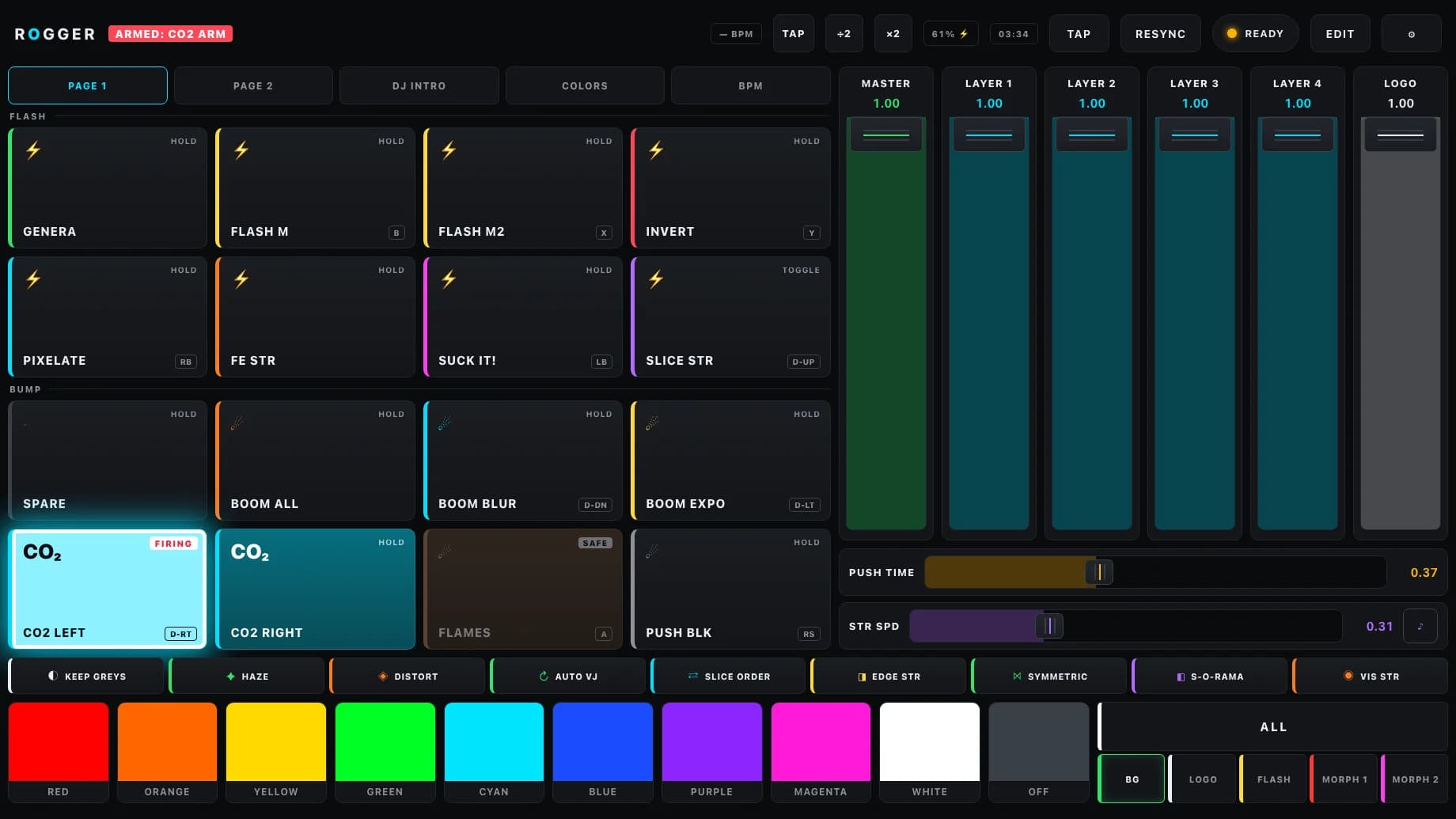
Captured from the app itself with the configuration it ships with, plus two DMX buttons and their safeties. Tap a screen to see it full size.
Features
Made for the moment the bass drops
01
Five pages, one surface
Flash and bump banks, ramp buttons that sweep an effect in while held, a DJ Intro grid, a colour lab and a BPM page. Eight faders, the utility toggles and the colour row stay on screen on every page.
02
The gamepad is part of it
Any button binds to a pad button or a combo such as RB+A. The sticks pan, zoom and rotate the composition, LT and RT work by depth, so a strobe stomp or master duck follows your pull. Rumble on every press.
03
Colour on the fly
Ten presets and a full picker, aimed at the background, the logos, the strobe, the ColorMorph colours, or ALL of them at once. Resolume does not echo colours, so ROGGER remembers what it last sent to each target.
04
Tempo from the room
Tap, follow Resolume's own BPM, or let the mic analyser listen. It runs on Web Audio, sends the tempo to Resolume once it is confident and can fire a resync right on the predicted beat.
05
It knows your show
Reads the composition over Resolume's webserver to name the DJ Intro clips, and refuses to copy a clip that does not match its group. Test connection checks commands, feedback and the webserver one by one and tells you what to type when one is down.
06
Built for the road
Full screen, no menus, no sleep. Updates arrive as a small payload, are checked against a sha256 before they unpack, never swap code mid-show and roll back by themselves if a payload fails to start.
DMX
CO₂ and sparks, behind a safety
- Any button can output sACN (E1.31, multicast or unicast) or Art-Net instead of OSC: hold, toggle or a timed shot.
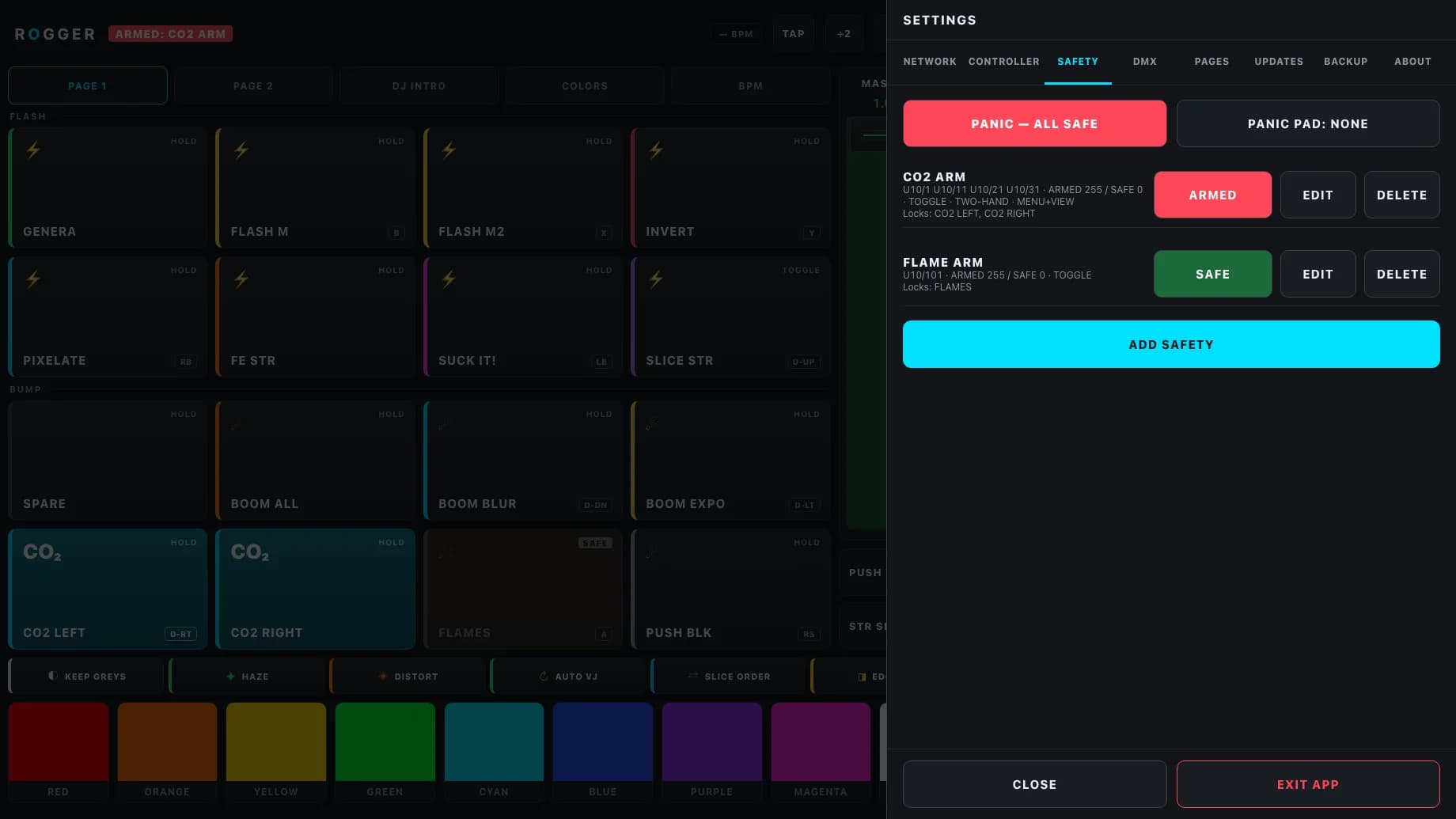
- A safety is the arm channel of a CO₂ jet or spark machine. It is SAFE at launch, on disarm, on PANIC and when ROGGER quits.
- Buttons linked to a safety are greyed out and cannot fire while it is SAFE. Disarming forces them back to their default at once.
- Two-hand arming needs a controller button and its modifier held together. One safety can cover a whole bank of arm channels.
- Max fire time cuts a jet that stays on too long. Per-button sACN priority, a preview mode that fixtures ignore, and a live DMX monitor.
Requirements
What you need
- System
- Windows, x64. A portable exe: no installer, no admin rights. It is unsigned, so Windows may ask once.
- Hardware
- Any Windows x64 handheld or touchscreen PC with an Xbox-style controller: ROG Ally, Legion Go, MSI Claw, Steam Deck running Windows. Not SteamOS or macOS.
- Screen
- Laid out for the ROG Ally X's 7-inch 1920 × 1080 touch panel and zoomed to fit at its default 150 % scaling. Any Windows PC whose screen holds 1704 × 1035 works too.
- Resolume
- Arena or Avenue with OSC Input on. OSC Output back to ROGGER (port 7001) for lamps, latches and Auto BPM. The webserver (port 9292) for the DJ sync and Test connection. Checked against Arena 7.26.
- DMX
- Optional. sACN or Art-Net on the same network as your nodes, only for the DMX buttons and safeties.
- Audio
- Optional. A mic or line input for the BPM page.
Free and open source (MIT)
Take it, use it, change it
ROGGER costs nothing and the whole source is on GitHub under the MIT licence. Open the exe, point Settings → Network at the machine running Resolume, run Test connection and play. There is no build step and no framework, so if you know plain JavaScript you can change it. Issues and pull requests are welcome.
Other products
- CrewCompassevent and tour management for production crews →
- DMX GatewaysACN ↔ Art-Net for show networks →
- Cue Monitora cue countdown on show timecode →
- SWCTRLa switch console for show networks →
- TourTaglabels for touring gear, in exact millimetres →
- HomeVaultan offline-first inventory for iPhone and iPad →